 Meadhall
Your account, privacy and data
Your profile and characters, reminders, downloading what Meadhall holds, and deleting your account.
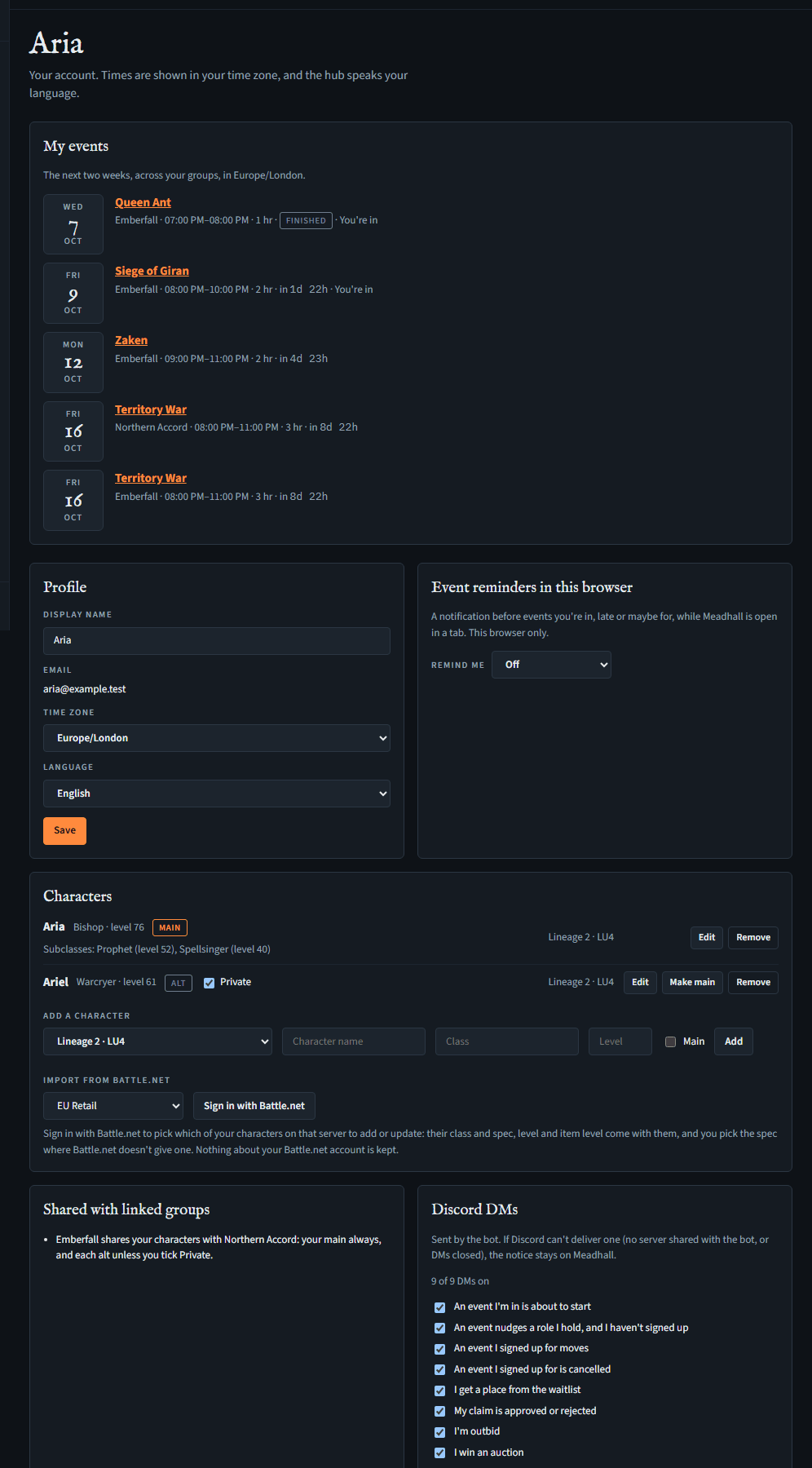
Your account page
Open it with Your account at the foot of the menu (your initial and name, with "Your account" under them). It has:
- My events: the next two weeks across all your groups, with your answer to each.
- Profile: Display name (up to 40 characters), your Email (from Discord, if Discord says it's verified; you can't change it here), Time zone and Language. Press Save.
- Characters: add with game and server, name, class (one of that game's classes, as the suggestions spell them: anything else, such as Dar, is refused and the classes it could mean are named) and level (all four needed), and Main if it's the one you play most: a server has one main, so ticking it on an add or an edit makes the character that was main there an alt, as Make main does. On Reborn the server list has each world (Lineage 2 · Signature x1 (Reborn), Eternal x10, Origins), as the world decides the classes: Origins is High Five, with the Kamael classes; the other two are Interlude. A World of Warcraft character can also have its Realm, typed as the game spells it, and its Item level (a whole number from 1 to 1000); both are optional. Its line then shows the realm with the server, as in Silvermoon (EU Retail), and the item level after its level. Your group sees your main's on its People page; linked groups' rosters don't carry them yet. On each character's line, Edit opens its name, class and level to change (all three needed, as when adding; the game and server stay: to move a character, add it again there), and a World of Warcraft character's realm and item level (empty one to take it off), and, for a Lineage 2 character, its Subclasses: Add a subclass gives a line for its class (one of the game's, as for the main class) and level (up to three subclasses, each from level 20, where subclasses start), and Remove beside one takes it off; then Save or Cancel. A character's subclasses show on its line and wherever that character is shared on People, Stats, the Clan page or a linked roster; Make main makes an alt your main, and the character that was main on that server becomes an alt, as in Discord's
/me; Remove takes one off (without asking). - Event reminders in this browser (reminders).
- Discord DMs: which direct messages the bot sends you; all are on to start. It's the same setting as the bot's
/me notifications(the bot's DMs). - Your data and Delete my account (below).
If one of your groups shares its members' characters with an alliance or clan above it, the Me page says so under Shared with linked groups. Your main is always shared; tick Private beside an alt to keep it out. Nothing is shared until you mark a main.
If someone in one of your groups changes a character's class or level (People), the character says Changed by them, in which group and when, until you save it yourself, and the bot DMs you.
Importing characters from Battle.net (World of Warcraft)
Instead of typing your characters (Retail or any Classic version but WoW Forever), you can bring them in from your Battle.net account, with their class and spec, level and item level.
- Under Characters, in Import from Battle.net, pick the server (EU or US, and the version: Retail, Classic, Classic Era, Hardcore, Season of Discovery or Anniversary) and press Sign in with Battle.net. You sign in on Battle.net's own page and come back to Meadhall.
- Your characters on that server are listed (Classic Era, Hardcore and Season of Discovery share one list at Battle.net: Meadhall keeps the ones on the version you picked, by their realm), highest level first, each marked new or update (one you already have, by name and realm). Tick the ones you want and press Import selected.
- A new one is added (your main there if you have none yet); one you have is updated, keeping whether it's your main. On Classic Era, Hardcore, Season of Discovery and Anniversary, Battle.net gives a character's class but no spec: pick its spec from the list beside it, which ticks it (this works even when Battle.net didn't give the character's details in time). Elsewhere, a character whose class Meadhall doesn't know yet (or whose details Battle.net didn't give in time) is shown but can't be imported: add it by hand.
To bring item levels up to date, import again (sign in once more): nothing about your Battle.net account is kept between imports. The list you pick from lasts ten minutes. An import also ticks your raid lockouts: a boss your character killed since that raid's last weekly reset ticks the raid and difficulty, as if you'd ticked it yourself (the Raid timers page); on MoP Classic, a Normal or Heroic kill ticks the raid's one Normal / Heroic lockout.
What Meadhall keeps
In short: what the hub needs to work, and what you and your groups put in. Your name, email and Discord id are encrypted with a key of your own before they're stored, in London (AWS eu-west-2). No adverts, third-party analytics or trackers; Meadhall keeps service-wide counts without ids or names to operate the service. What you put in a group is seen by that group's members. If you lead a group, Meadhall's support staff can see your name as the group sees it, so they know who to talk to about that group. The privacy policy says it all in full.
Downloading your data
- Account page, Your data: press Download my data.
- You get a JSON file,
meadhall-export-date.json: your account, your characters, and, for each group you're in, your own records there (sign-ups, what you recorded, DKP and clan entries about you, and in a Lineage 2 group with box clans which clan each of your characters is in).
Up to 10 downloads an hour.
Exporting a whole group
Needs Download the group's data (leaders, unless they give it to a role). Loot council wishlists are the council's: someone without Log drops and remove loot lines gets only their own wishlists, and not who wanted each council drop.
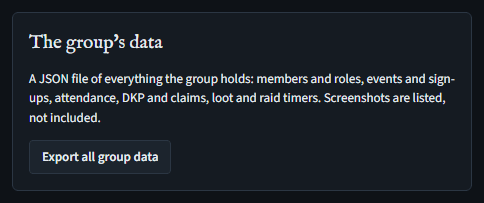
Settings, The group's data, Export all group data: a JSON file of the group's members and roles, events and sign-ups, attendance, DKP and claims, loot, soft reserves and loot wishlists, raid timers, auctions and bids, what linked groups share with it, an alliance's roster, item prices, drops and jewel allocations, and the clan page's: its ledger, level and skills, the box clans with each one's level and skills, and which clan each member's characters are in. Screenshots are listed, not included; webhook addresses and codes are left out. Attendance alone can also be saved as a spreadsheet: Events, Attendance history, Download CSV.
Paying for a plan
Group leaders. Members never pay, and never see this.
A new group starts on Free. Free runs a small group's week:
- up to 9 members in Lineage 2 (one party) or 10 in World of Warcraft;
- 3 live joiner codes, 5 roles of your own and 5 event presets;
- 50 MB of claim screenshots (DKP);
- events and sign-ups, raid timers and the loot log;
- DKP in one pool (awards and the ledger), and EPGP with its EP and GP pools;
- the clan tools;
- the counts on Stats (members, and how many of each class and role);
- the reminder channel with event reminders;
- every bot command (
/auctionand/fairnessopen their pages on the site, on every plan).
These need a paid plan, a licence key or a founder code:
- auctions;
- raid window alerts;
- more DKP pools;
- DKP decay;
- the charts on Stats (Stats).
An alliance's own pages need the Alliance plan on the alliance (or a founder code), not on the CPs under it:
- its roster, with its spreadsheet imports (the only imports there are so far);
- its DKP, drops, prices, drop fairness and epic jewel allocation;
- alliance-wide stats.
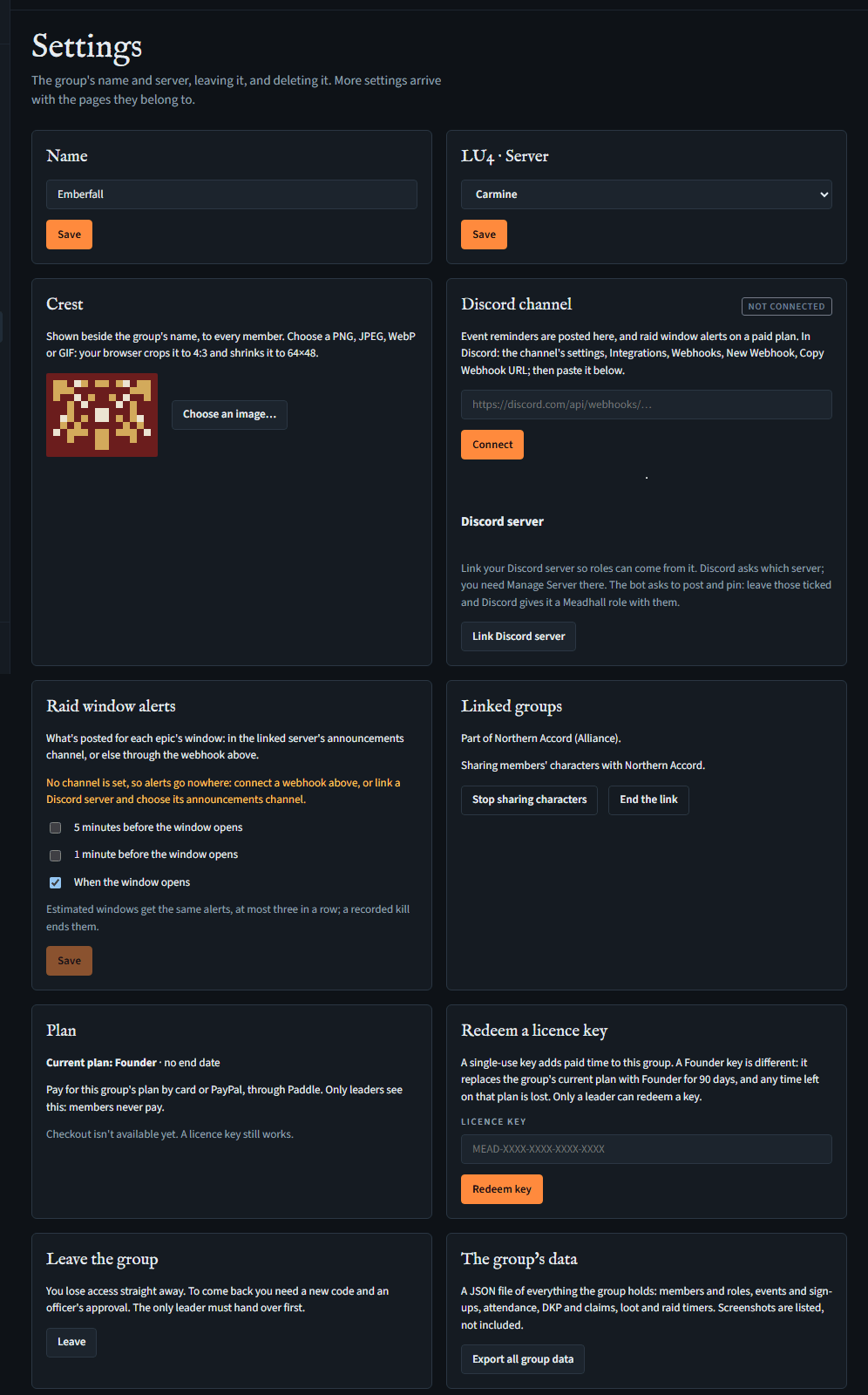
On a plan without one, its page shows a short notice at the top: what isn't on the plan, which plans add it, and, for a leader, a See the plans in Settings button to this card; anyone else is told a group leader can change the plan. The page stays readable under it, without its buttons for adding or changing anything. Raid window alerts show their switches locked, with the same line. Anything else that's refused for the plan says so, and that a group leader can change the plan in Settings, under Plan.
A group already bigger than its plan keeps everyone, but can't take anyone new until it's under the limit or on a bigger plan. The plans and their prices are on the pricing page; paying, cancelling and refunds are in the terms. The group's Settings page has a Plan card with the group's current plan and until when.
The paid plans:
- CP (Lineage 2, up to 15 members) or Raid team (WoW, up to 30);
- Clan / Guild (up to 300);
- Alliance (Lineage 2, 300 per group).
Each adds auctions, raid window alerts, up to 20 DKP pools, DKP decay and the charts on Stats, with 20 joiner codes, 25 roles, 25 presets and 10 GB of claim screenshots; only Alliance adds the alliance's own pages and imports, and alliance-wide stats. Paid features are used on the site: the Discord bot works the same on every plan, and its /auction and /fairness link to their pages. Groups made before 3 October 2026 were moved to Free that day; their leaders may be given a founder code.
Nothing is held back when a plan ends, or when a group moves to a plan without something it used. Its auctions and the alliance's pages stay readable, as they were: only new use stops (listing, bidding on or cancelling an auction; changing the alliance roster, awarding its DKP, pricing, recording drops, allocating jewels, importing). An auction still open then takes no more bids and closes at its time as usual, the winner paying their bid. The whole group can also be exported on any plan.
Where checkout is set up, the card offers the plans in your game's words: CP, Clan or Alliance for a Lineage 2 group, Raid team or Guild for a World of Warcraft one, each Monthly or Yearly. Choose one and press Continue to payment: Paddle's checkout opens over the page, shows the price with tax for your country, and takes the card or PayPal payment. Meadhall never sees card details. When the payment goes through, the card says Payment received: your plan will change in a moment, and the plan changes once Paddle tells Meadhall the payment is done, usually within seconds; if it hasn't within about half a minute, reload the page a few minutes later.
- A plan is refused if the group is already bigger than it (a CP plan is for up to 15 members in Lineage 2, a raid team up to 30 in WoW; a clan, guild or alliance up to 300), and Alliance is for Lineage 2 groups only.
- A founding group's card says it's a founding group, and, until the group first pays, that the founders' discount applies: 50% off for 3 months when paying monthly, or the first year when paying yearly. It's applied for you, once per group.
- A group that already pays by subscription can't start a second one.
Until checkout is set up, the card says Checkout isn't available yet. A licence key still works.
To pay in crypto, email privacy@meadhall.app: a yearly plan (CP / Raid team, Clan / Guild or Alliance) is arranged by email, and once the payment arrives the group is given a licence key for it (Redeeming a licence key).
Managing the subscription
Once a group pays by subscription, its Plan card says how things stand: when it renews, that it's cancelled and when the plan ends, or that a payment failed.
- The leader who pays (the one whose checkout started the subscription) gets Manage billing. It opens Paddle's billing page in a new tab, signed in for you: change the card, see and download invoices, or cancel. If your browser blocks the new tab, the card shows a link to open instead. Only the leader who pays can do this; it still works if you stop being a leader, so you can always stop paying.
- Other leaders see the plan's state and that another leader pays, without the button. The card doesn't say who.
- Cancelling keeps the plan to the end of the period already paid for; the card then says The subscription is cancelled: the plan ends on that date. Nothing is deleted when it ends: a group on Free still reads and exports everything.
- A failed payment: Paddle tries the card again over the following days, and the group keeps its plan for 7 days from the first failure. The card says A payment failed: Paddle will try again, with the date the plan lasts until. The leader who pays can update the card with Manage billing. Meadhall doesn't email about it yet.
If the leader who pays leaves
If the leader who pays leaves the group, is removed, or stops being a leader, the plan stays until the end of the period paid for, and the other leaders' Plan card says so. Meadhall then cancels that person's subscription, so it isn't charged again: the plan stays until the end of the period already paid for (a payment that has failed, or a paused subscription, is cancelled at once). Once Paddle says it's cancelled, the plan picker comes back on the card, and another leader can start a subscription of their own; the plan already paid for runs on until the new one starts.
Redeeming a licence key
Group leaders.
On the group's Settings page, use Redeem a licence key. Enter the single-use MEAD-… key and choose Redeem key. Paid days are added after the group's current paid end date, so time is not lost. A fixed end date never shortens the same plan, and a lifetime key has no end date. A Clan key cannot be stacked onto a live Alliance plan, or an Alliance key onto Clan; ask support to change the plan first.
A founder code is redeemed the same way, and makes the group a founding group: Founder (everything on) for 90 days from that day, after which the group is on Free unless it pays, and, when it does pay, the founders' discount (above), once. The group stays a founding group after the 90 days. Each group can redeem one founder code, and each person one, on whichever group they use it: deleting your account and signing in again with the same Discord account doesn't give you another. A founder code works straight away on a group that's on a free trial, or on a plan from a licence key or from support: Founder replaces that plan, so whatever was left of it is gone (it doesn't wait for it to end, and isn't added to it). It's refused on a group already paying by subscription, so the plan isn't paid for twice. Meadhall keeps a note on your account that you redeemed one (the group and when): it's in your data download, and goes when you delete your account. It also keeps a separate record of when, under a keyed hash of your Discord account id, which stays after you delete your account so that you can't redeem a second code; it names no account or group, and is deleted when the founder-code offer ends (privacy policy).
Deleting your account
- Account page, Delete my account: type
DELETEin the box. - Press Delete my account for good.
Your account, characters and settings go, you leave every group, and your personal key is destroyed first, so nothing of yours can be read again, backups included. If you were a group's only leader, leadership passes on; a group left empty is deleted (a big one takes several steps: keep the page open while the line beside the button counts the items deleted). If the page is closed before it's done, the deletion has already begun: you're signed out and the account can't be used, and Meadhall finishes it by itself, usually within a day (a very big group of your own can take a few nights). Signing in again a few minutes later also carries it on. Until it has finished, signing in says your account is still being deleted; after that, signing in starts a new account. What belongs to a group (its sign-ups, attendance, DKP lines and loot log) stays with the group. If you redeemed a founder code, the record of when (under a keyed hash of your Discord account id) stays too, so a new account can't redeem another (above). It can't be undone.
If you cannot use the account page, contact privacy@meadhall.app. After verifying the erasure request, Meadhall's operator can start this same permanent deletion for you.
Signing out
Sign out, at the top of your account page (or under Your data). It ends the session on this browser.
If you report a lost device or another sign-in problem, Meadhall's operator can end every open session on your account. You will need to sign in again on each device.