 Meadhall
Stats and the clan page
The group's make-up, counted live from members' characters; and, for Lineage 2 clans and CPs, Proof of Loyalty and clan skills.
Stats
Needs See the group's stats (every member).
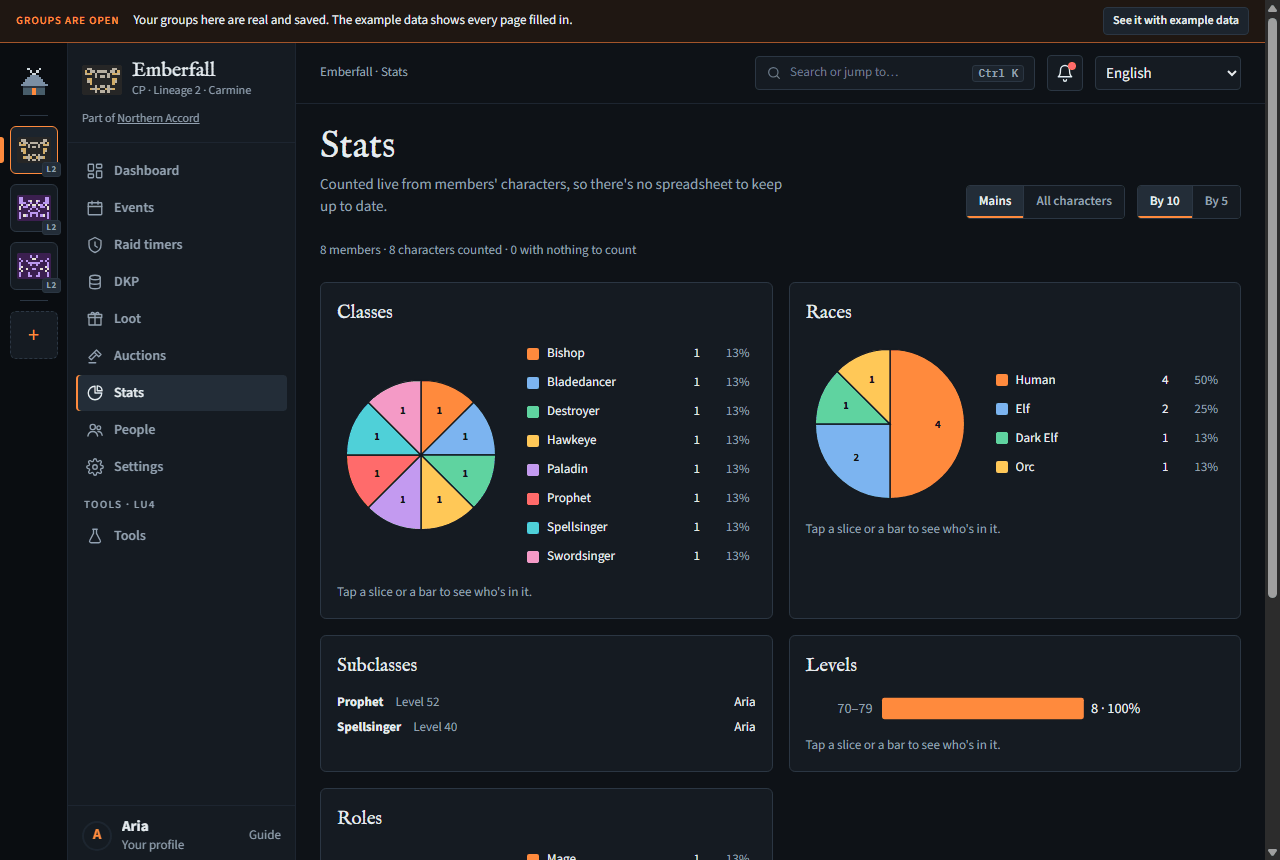
Stats counts the characters members added on their account pages, so there's no spreadsheet to keep up to date. Someone with no character on the group's server (or, counting mains, no main marked) counts as Unknown.
- Count: Mains (each member's main) or All characters.
- Level bands: By 10 or By 5.
- An alliance or clan with linked groups that share characters has a Who switch: With linked groups counts their characters too (needs See the characters linked groups share). In an alliance, these alliance-wide stats come with the Alliance plan; a clan with CPs linked under it has the switch on any plan.
- The charts: Classes (a class saved before Meadhall checked them, like Dar, shows as its own slice until its member edits it), Races (where the game has them), Levels and Roles (in Lineage 2: mage, melee, dagger, bard, recharger, buffer, healer, tank, summoner and archer; in World of Warcraft: tank, healer and DPS). A class with no role yet, such as a starting class, shows as 1st class. Subclasses lists each counted character's subclass, level and owner separately; subclasses don't increase the number of characters in the charts.
- Tap a slice, a legend entry or a bar to list who's in it.
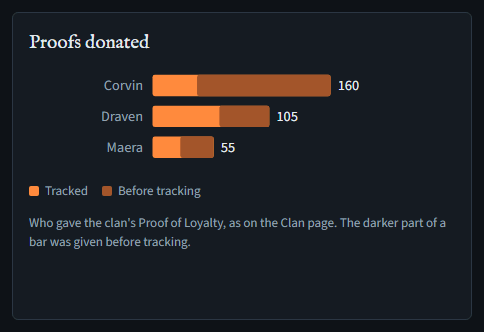
Proofs donated (Lineage 2 clans on LU4): who gave the clan its Proof of Loyalty, a bar for each donor (the 15 who gave most, then Others). The darker end of a bar is what they gave before you started tracking; hover a bar for the two numbers. It's there for someone who can see the clan page's donors (See the clan's Proof of Loyalty and skills), with the charts on a paid plan. A CP's Stats page doesn't have it: a CP's Clan page doesn't show who gave what.
On the Free plan, Stats shows counts without charts: members, characters counted and those with nothing to count (and the linked groups' characters, with the Who switch), and lists of how many characters have each class and each role. Tapping to see who's in a class or role, the Races and Levels charts, the pie charts, Subclasses and a clan's Proofs donated come with a paid plan, and where they'd be the page says so; a leader gets Plans are in Settings, which opens the group's Settings page with its Plan card (Paying for a plan). Level bands shows only with the charts.
Charts can't be exported yet.
The clan page (Lineage 2)
Reading needs See the clan's Proof of Loyalty and skills (every member); recording needs Record Proof of Loyalty and clan skills (officers). A role that may record but not see gets the page without who: each clan's count of characters but not their names, and no Where the proofs went, Who gave them or Ledger.
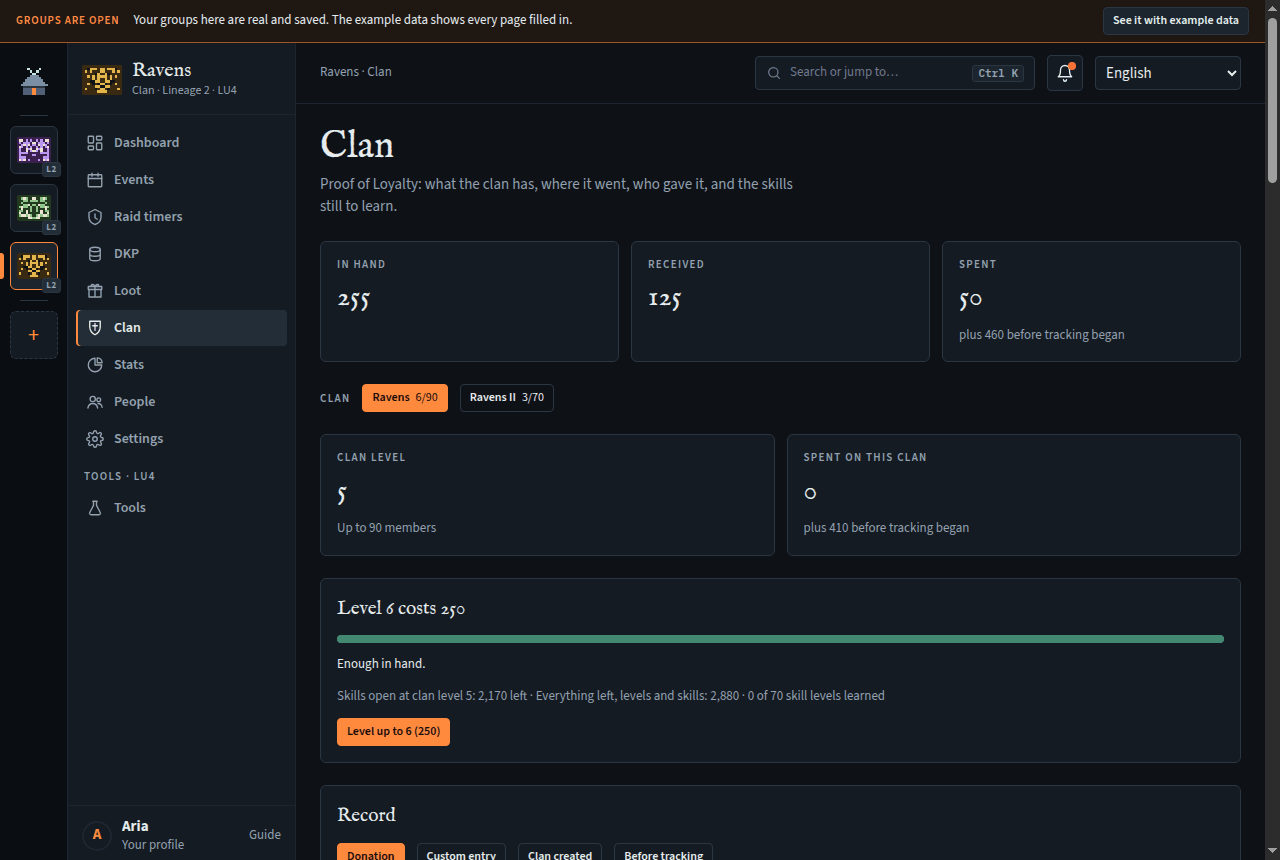
Clans on LU4, and CPs linked under one, have Clan: what the clan has in Proof of Loyalty, where it went, who gave it, and the skills still to learn. The ledger, Who gave them and recording are the clan's own page; a CP linked under a clan sees a read-only summary of the clan's Proof of Loyalty.
Start from where you are
- In the Record card, Starting point (offered while nothing is recorded): the current Clan level, the Proof of Loyalty In hand, and each skill's level.
- Press Set the starting point.
Record what comes in and goes out
- Donation: From a member or someone else by name, how many, a note; Record.
- Custom entry: a number in (+) or out (−) with what it was.
- Level up to n when you have enough (or Use an Alliance Manifesto instead where the game allows).
- Skill planner: each skill, its level now, the next level's cost, and Learn. Leader's skills: Record a use.
- Who gave them totals each donor. The Ledger lists every entry; Undo on the newest takes it back.
Box clans
Adding, renaming and removing them, and recording what's spent on them, needs Record Proof of Loyalty and clan skills (officers).
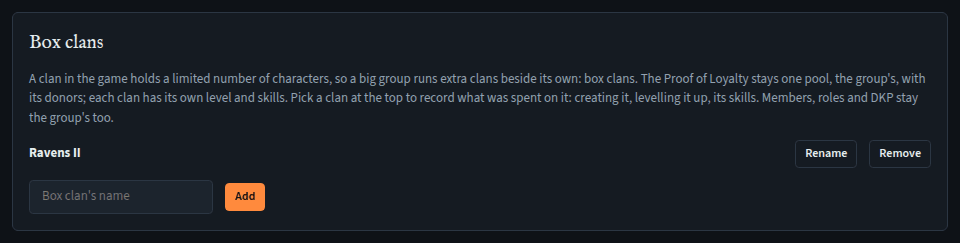
A clan in the game holds a limited number of characters, so a big group runs extra clans beside its own: box clans. The Proof of Loyalty stays one pool, the group's: donations and Who gave them are for the whole group. Each clan has its own level and skills, so what's spent is recorded against the clan it went to. Members, roles and DKP stay the group's too.
- At the bottom of the Clan page, in Box clans, type the box clan's name and press Add (up to 10).
- A Clan row of buttons appears under In hand, Received and Spent: the group's own clan and each box clan. The one picked is what the clan level, the next level's price, the Skill planner and Leader's skills show, and where spending goes.
- With a box clan picked, record what it cost: Clan created (once per clan, 0 if it cost nothing), Level up to n, Learn and Record a use. Each comes out of the group's proofs in hand.
- A box clan that was already part way when you started: pick it and, before recording anything for it, set its Starting point (its level and skills; the proofs in hand are set once, on the group's own clan).
- Spending from before you started tracking: pick the clan, then Before tracking in the Record card and Spent, with how many proofs, what they went on, and the date if you know it. It counts towards that clan and Where the proofs went, never towards what's in hand (those proofs were gone already). A starting point's level and skills are counted already, at the game's prices: record here what they don't cover, such as leader's skills used or the clan's creation.
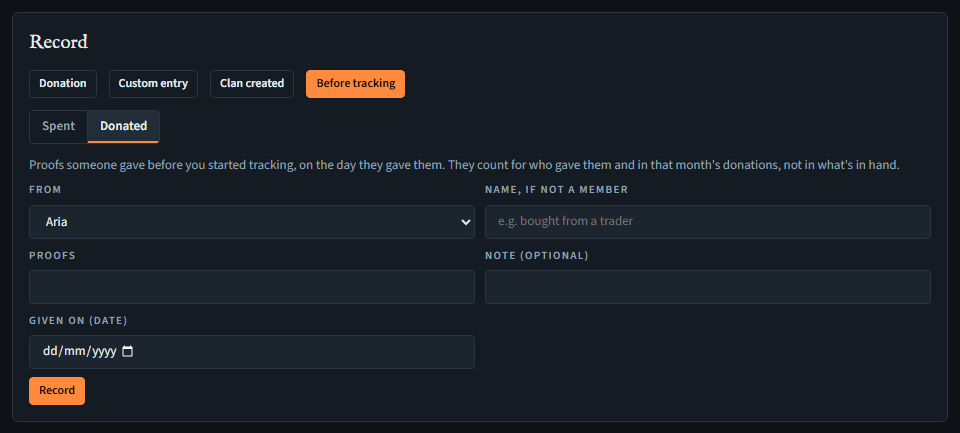
- Donations from before you started tracking: Before tracking in the Record card, then Donated: From a member or someone else by name, how many, a note, and Given on (date), which it needs. Or record a Donation as usual and fill in Given before tracking (date): it's the same. It counts towards Who gave them and that month in Where the proofs went, never towards the proofs in hand or Received (those proofs were spent already, or are in the starting point's In hand). The ledger shows it in brackets with the date it was given. It doesn't stop you setting a starting point.
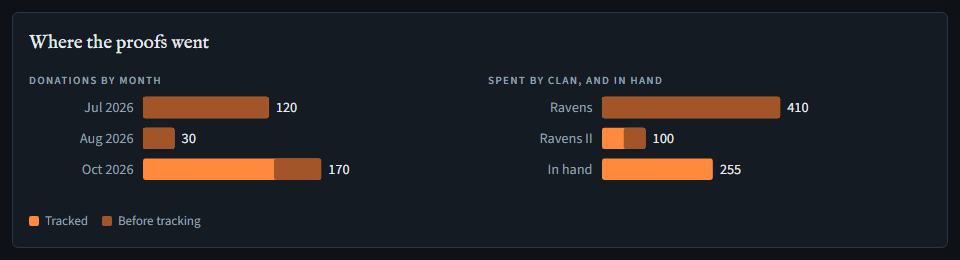
- Where the proofs went charts the donations by month, and how much went on each clan, against what's still in hand. What came from before tracking (donated or spent) is the darker end of a bar, and a key under the chart says which shade is which; hover a bar for the two numbers. The ledger tags each entry spent on a box clan with its name.
- Rename follows a rename in the game. A box clan can't share the group's name, and the group can't be renamed to a box clan's. Remove works only while no entry names that box clan: undo those first. Characters placed in it go back to Not in a clan.
Which clan your characters are in
Anyone who can see the clan page places their own characters; moving someone else's needs Record Proof of Loyalty and clan skills (officers).
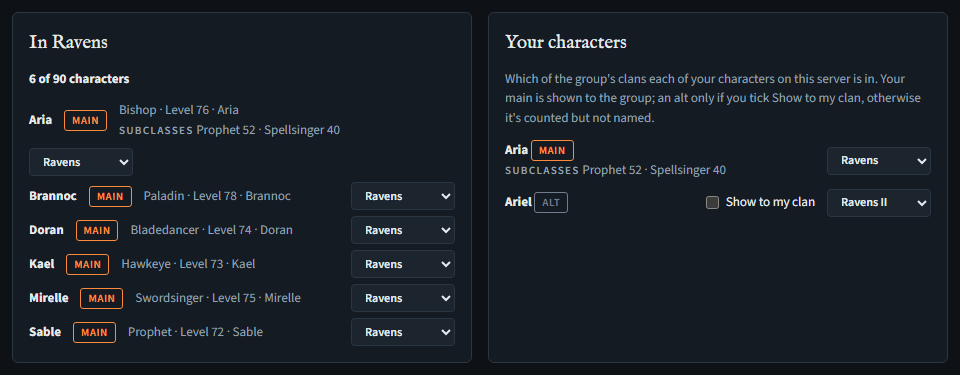
- In Your characters, each of your characters on the group's server has a list: pick the clan it's in, or Not in a clan. Characters come from your Me page: add them there first.
- Your main is shown to the group. An alt is shown only if you tick Show to my clan; otherwise it's counted in its clan but not named.
- In clan lists the clan picked at the top: how many characters it has against the game's limit for its level (a red Over the game's limit when it's past it), the ones it names with their class, level and subclasses, and how many alts aren't shown. The clan buttons at the top show each clan's count too.
- Officers can move a character they can see with the list beside it, for when a character changed clan in the game and its member hasn't said so yet.
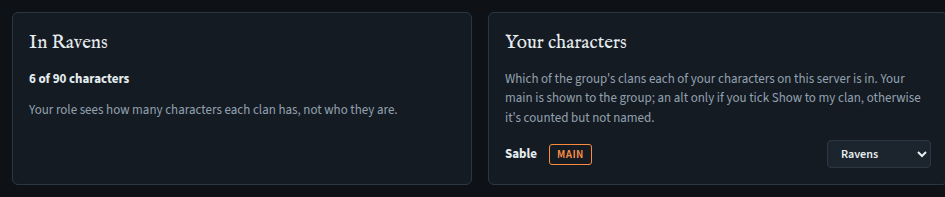
A role that may record but not see (only Record Proof of Loyalty and clan skills) gets each clan's count without names, and its own characters as usual.
Names, classes, levels and subclasses come from each member's own account when the page opens, so they're always current. Leaving the group takes your choices with you, and deleting a character takes its own; removing a box clan puts its characters back to Not in a clan.
In a CP. A CP has no Proof of Loyalty of its own: while it's linked under a clan, its Clan page shows that clan's, read-only: what's in hand, the clan level, received and spent, the next level and the skill planner — the clan's own level and skills; its box clans stay on the clan's page. Not who gave what. Recording happens in the clan, by the clan's officers, and so does saying which clan your characters are in; a member of both gets Open the clan. A CP that isn't under a clan has no Clan menu item; opened by a direct link, the page says it isn't linked under a clan. Entries a CP recorded before stay in its data and its export.