 Meadhall
Raid timers
Official LU4 elemental raid status alongside the private timers your group records.
Elemental raid bosses
For an LU4 CP or clan with a server selected, Meadhall shows the official public status of Kaldrak, Naerith, Erdrath and Zephrath for that server: Gamma, Black, White or Carmine. Alive means the source says the boss is alive. Otherwise the card counts down to the start of its respawn window and then to the end of that window.
These bosses use the published 9 ± 1 hour rule: an 8-hour minimum delay followed by a 2-hour window. This is the same delay-and-window model used by Meadhall's other timers.
Meadhall's server checks Masterwork's public raid rating every five minutes. Your browser never contacts Masterwork, and opening or navigating the hub never starts a check. Each server is updated only when all four bosses were read successfully. If the source cannot be reached or changes format, Meadhall keeps the last successful result and marks it as delayed instead of showing an empty result.
A CP or clan created before server selection was added is told to choose its LU4 server in Settings. Alliance groups have no server-specific elemental feed.
Your group's epic timers
A Lineage 2 epic boss respawns some hours after it dies, at a random moment inside a window. Record when it died, and Meadhall works out when the window opens and closes, for everyone in the group, in their own time zone.
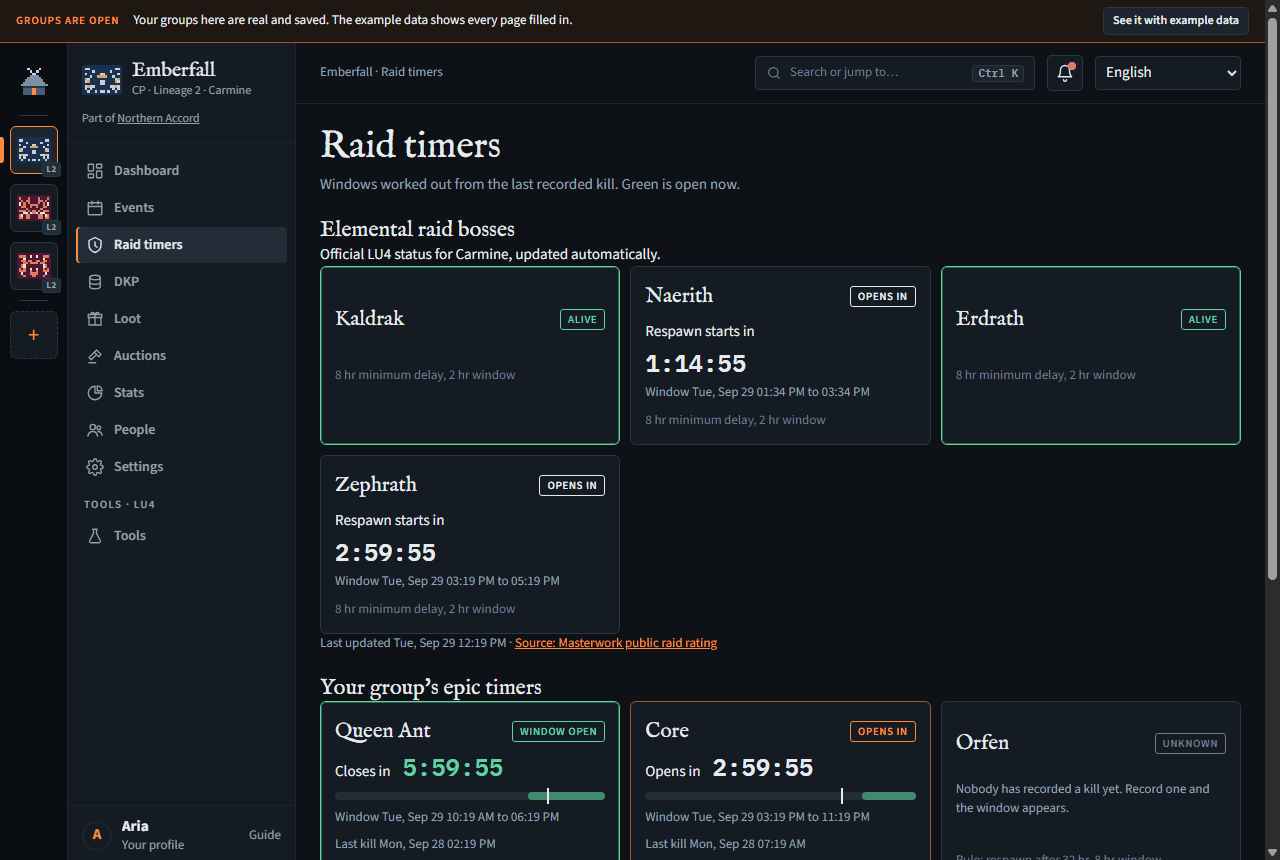
Each boss card shows:
- a pill (Window open, Opens in…) and a countdown to when the window opens or closes;
- a timeline, Window … to …, Last kill …, and the rule (respawn after 20 hr, 8 hr window), with · your group's rule when you changed it;
- if a window closed with no kill recorded: "The window has closed with no kill recorded. Someone else may have it." Meadhall then estimates the next window from the missed one, and says it's an estimate.
Lineage 2 on LU4 has Queen Ant (respawn after 20 hours, 8-hour window), Core and Orfen (32 hours, 8-hour window) and Zaken (4-hour window; its respawn delay isn't known publicly, so set your own). The defaults come from masterwork.wiki; change them if your server differs (LU4 epic boss respawn).
Other Lineage 2 servers: adding and removing bosses
Needs Set respawn rules (officers) to add or remove; every member sees the timers.
On every Lineage 2 server but LU4 (Reborn, ElmoreLab, Asterios, Scryde, E-Global or Other server: Lineage 2 servers), the Raids page starts empty and shows only the bosses your group adds, from one list of the epics most versions share: Queen Ant, Core and Orfen (respawn after 24 hours, 4-hour window), Zaken and Frintezza (48 hours, 4-hour window), Baium (120 hours, 8-hour window), Antharas (192 hours, 8-hour window), Valakas (264 hours, 8-hour window), and Beleth and Freya (4-hour window; their delay isn't known, so set your own). These are the usual Interlude rules; many servers change them. Reborn's published rules for each world are on L2 Reborn epic respawn, and how the windows work on Lineage 2 epic boss respawn timer.
- Under Add a boss, pick the Boss. Its usual rule is filled in: change Respawn after (hours) or Window (hours) if your server's differs.
- Press Add. The boss gets its card, and kills are recorded on it as on LU4.
- To stop tracking one, press Remove on its card. It asks first, then the boss goes with its recorded kills and your group's rule for it; you can add it again later, starting fresh.
Recording a kill from Discord (/raids kill) works only for a boss your group has added. LU4's four bosses are always shown and can't be removed.
World of Warcraft: lockouts
Every member.
A World of Warcraft group's Raids page shows who's locked to which raid now, instead of respawn windows. Most lockouts last until your region's weekly reset (US: Tuesday 15:00 UTC; EU: Wednesday 04:00 UTC), shown at the top with a countdown; a raid with its own reset (below) says when it resets. After its reset, a lockout is gone and everyone is free for that raid again.
- Your characters: each of your characters on the group's server, with a tick box for each raid and difficulty (on Retail: Raid Finder, Normal, Heroic, Mythic). Tick what each one is locked to; untick a mistake. You tick your alts too, but only you see theirs.
- Below, the group's members by their main, with Locked or Free: a table per raid with a column per difficulty, and one table for the raids with a single difficulty, a column per raid. A member without a main on this server shows a dash.
Locking an event's attendees
Needs Record boss kills (officers).
After a raid night, Lock an event's attendees locks everyone at once: pick one of the last week's events whose attendance is confirmed (Events), the raid and the difficulty, and press Lock them. Each person confirmed at the event gets the lockout on the character they signed up as, or on their main on this server if they didn't pick one; anyone with neither is named, and nobody else changes. The lockout is dated at the event's start, so an event from before that raid's last reset can't be locked (its lockouts have already ended).
The raids are each line's current ones:
- Retail: The Venomous Abyss (Raid Finder, Normal, Heroic, Mythic).
- Classic (Mists of Pandaria Classic): Mogu'shan Vaults, Heart of Fear, Terrace of Endless Spring, Throne of Thunder and Siege of Orgrimmar (Raid Finder, and Normal / Heroic as one choice: in the game they share one lockout).
- Classic Era and Hardcore: Molten Core, Onyxia's Lair, Blackwing Lair, Zul'Gurub, Ruins of Ahn'Qiraj, Temple of Ahn'Qiraj and Naxxramas.
- Season of Discovery: Blackfathom Deeps, Gnomeregan, Sunken Temple, Molten Core, Onyxia's Lair, Blackwing Lair, Zul'Gurub, Ruins of Ahn'Qiraj, Temple of Ahn'Qiraj, Naxxramas and Scarlet Enclave.
- Anniversary (The Burning Crusade): Karazhan, Gruul's Lair, Magtheridon's Lair, Serpentshrine Cavern, Tempest Keep, Mount Hyjal and Black Temple.
- WoW Forever: none yet; its raids open in December, a few weeks after it launches, and come to Meadhall then.
A raid with one difficulty shares a table with the others like it, a column each. Most raids reset with the weekly reset; some keep their own, shown under their name: Zul'Gurub and Ruins of Ahn'Qiraj every 3 days, Onyxia's Lair every 5, and Season of Discovery's Blackfathom Deeps, Gnomeregan and Sunken Temple once a week at their own time (EU Wednesday 20:00 UTC, US Tuesday 03:00 UTC). Each member ticks their own, or a World of Warcraft member's Battle.net import ticks them for the raids their characters killed since the reset (Importing from Battle.net).
Recording a kill
Needs Record boss kills (officers).
- Just killed it: press Record kill now. "… kill recorded. The next window is set."
- Killed earlier: press Earlier kill or rule…, set Killed at, and press Record this kill.
- A mistake: Undo last kill asks first; the kill before it comes back.
From Discord: /raids kill, or Kill beside a boss on /raids windows, or Record kill on the bot's window post.
Setting a boss's rule
Needs Set respawn rules (officers).
- Press Earlier kill or rule… (or Respawn rule… if you may set rules but not record kills).
- Set Respawn after (hours) and Window (hours); press Save.
- Use the default goes back to the server's rule.
Window reminders
Needs a paid plan (CP / Raid team, Clan / Guild or Alliance) or a founder code's 90 days (Plans). On Free, windows still show on the Raids page; nothing is posted to Discord.
When a window opens, Meadhall tells your Discord:
- if the bot is in your server with an announcements channel, it posts the window there (the bot's posts), with a Record kill button;
- otherwise, if the group has a reminder channel (Settings, Discord channel), a message there: "Queen Ant: window open. Closes 23:00 (in 8 hours).", in the group's language for public posts (Settings, Meadhall in your Discord, Language of public posts), English until one is chosen.
On the hub, kill times are encrypted and only the group's members see them. A post or alert in Discord shows the window, and the window post its kill time, to everyone who can read that channel: put them in a channel only your group can read.
If a window closes with no kill recorded, Meadhall assumes the boss spawned and died unseen, and tells your Discord when the estimated window after it opens, as one plain line in the same place (no post, no button): "Queen Ant: the estimated window is open until 03:40 (in 8 hours). No kill was recorded in the last window." It does this for at most three estimated windows in a row. Recording a kill ends it, and the reminders follow the new kill.
Which of these Meadhall posts is set in Settings, Raid window alerts, by anyone who can manage the Discord link (the Raids page has a line linking there). It has three switches, for every boss at once:
- 5 minutes before the window opens: one line, "Queen Ant: the window opens in 5 minutes (15:00)." Off until you turn it on.
- 1 minute before the window opens: the same line, a minute before. Off until you turn it on.
- When the window opens: the post or message above. On until you turn it off.
Tick or untick, then press Save (it's greyed out until a switch differs from what's saved). The alerts already scheduled follow at once. Estimated windows get the same alerts, at most three in a row, and a recorded kill ends them. The alerts go where the reminders go: the bot's announcements channel if the server is linked with one, otherwise the Discord channel webhook. With neither, the card says the alerts go nowhere until one is set. A group whose plan doesn't include reminders sees the switches greyed out, with the plans that add them and, for a leader, a See the plans in Settings button to the Plan card.
On the site, the Dashboard's Raid windows tile lists the bosses open now or opening within 24 hours.