 Meadhall
Alliances and linked groups
Put a CP or clan under an alliance, with both sides' consent. What an alliance gets: alliance DKP, drop fairness and epic jewels.
What a link is
A group can sit under another one:
- a CP under an alliance or a clan;
- a clan under an alliance;
- a WoW raid team under a guild.
Both must be on the same game and server. The menu then says "Part of …" in the one below and "Includes …" in the one above; a name is a link where you're in that group too.
On its own a link shares only the two groups' names and kinds. The group below may also share its members' characters (next section), and a CP that shares with a clan brings its members into the clan (A CP's members in its clan). Otherwise nobody sees the other group's members list, DKP, events or settings through a link, though a group above can send an event to a group linked under it, which gets its own copy (see Events for linked groups).
A CP under a clan shows the clan's Proof of Loyalty on its Clan page (see Stats & clan).
What's not here yet. The alliance page the preview shows for the member CPs isn't built. An alliance group today has a Dashboard, Events, the Alliance roster, Alliance DKP, Drops, Prices, DKP, Drop fairness, Epic jewels, Raid timers, Stats, People, Tools (on LU4) and Settings of its own.
Linking a group under another
Needs Link groups on each side (leaders, unless they give it to a role).
- In the group above (the alliance): Settings, Linked groups, press New link code. A code works once, for 7 days; up to 5 at a time. Send it to the other group's leader. Revoke cancels an unused one.
- In the group below (the CP): Settings, Linked groups, type the code in Link code and press Ask to join. It says "Asked to join …: waiting for its leaders." (Withdraw the request takes it back.) The Share our members' characters with it tick is on: untick it to link without sharing.
- In the group above: the request shows under Asking to join. Press Approve or Decline.
A group sits under one group at most; a group can have up to 50 under it.
Sharing characters with the group above
The group below decides, with Link groups (leaders, unless they give it to a role).
While a CP (or clan) shares, the alliance (or clan) above keeps a copy of its members' characters on the same game and server: name, class, level, subclasses, and whether each is a main or an alt. Never anyone's account name, email or Discord id, except that a CP's members join the clan above it (next section).
- Each member's main is always shared; each alt too, unless they tick Private beside it on their Me page. Someone with no main marked shares nothing.
- It stays current by itself: a character added, changed or removed, a member joining or leaving, all show above within moments. If one can't get through, it's tried again, and put right overnight at the latest.
- Settings, Linked groups, Stop sharing characters deletes the copy above; Share our characters sends it again. Ending the link deletes it too. Either way it goes within moments, or overnight if it can't get through straight away.
- A link made before sharing existed shares nothing until the group below presses Share our characters.
A CP's members in its clan
While a CP is linked under a clan and shares its characters with it, everyone in the CP is also a member of the clan. Under an alliance this doesn't happen.
- They're on the clan's People, Roster, with their main, and the clan is in their list of groups. They hold the clan's Member role; the clan's leaders or officers can give them more roles, as anyone's.
- If the clan has linked its Discord server, its role sync treats them as any member: while they're on that server (and hold its group role, if it names one), the Meadhall roles mapped to Discord roles follow the Discord roles they hold there. Not being on the clan's server never locks them out of the clan: their place in it follows the CP.
- Someone who joins the CP joins the clan at once; someone who leaves the CP, or is removed from it, leaves the clan too. When the CP stops sharing, or the link ends, everyone who was in the clan only through the CP leaves it.
- Someone in the clan only through the CP can't be removed from the clan, or leave it, there: it says "in this group through Emberstorm: leave or remove them there, or end the link." A leader the clan makes of them is the same. Someone who also joined the clan themselves keeps their place and roles when they leave the CP; removing them from the clan, or their leaving it, leaves them in it through the CP, with the Member role in place of whatever the clan had given them. Someone already in only through the CP can't also join the clan with a code or from Discord: it says they're a member already.
- A CP's leader is a plain member of the clan: leading the CP doesn't make anyone a clan leader.
- If the clan is full, or someone is already in 20 groups, they aren't added; it's tried again every night.
- A link made before this existed brings its CP's members in overnight.
The linked roster
Needs See the characters linked groups share (every starter role holds it; leaders can take it away).
In the alliance (or clan), People has a Linked roster tab: every character the groups under it share, and the alliance's own members' mains, highest level first. Pick a group or a class to narrow it. The Group column says where each one comes from.
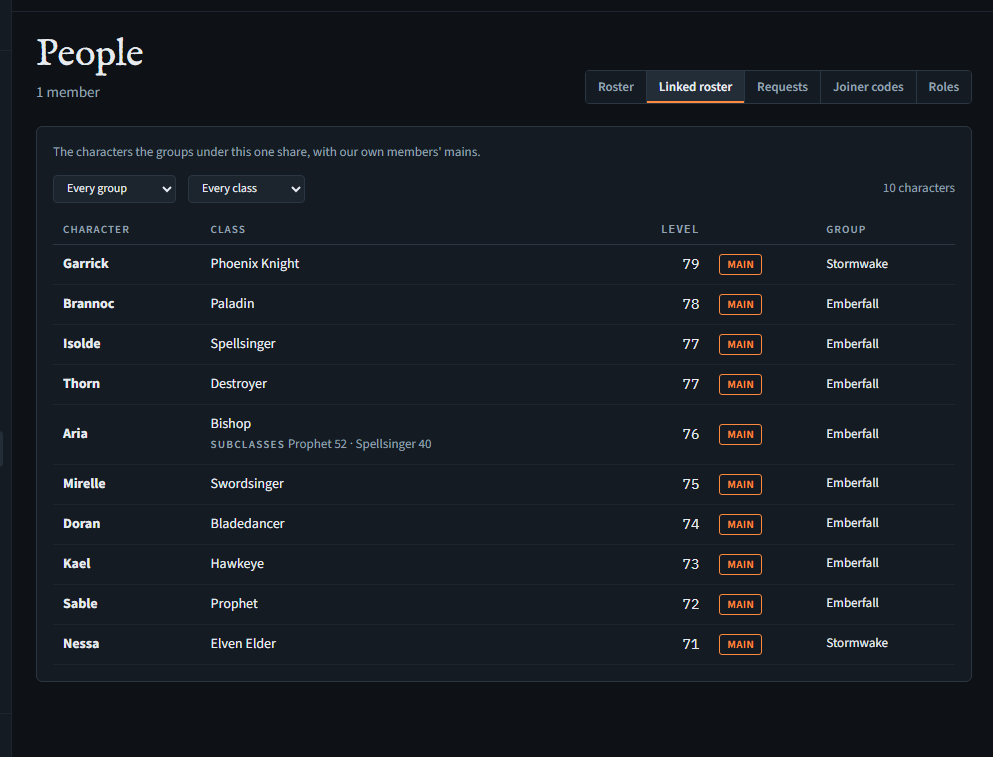
Stats has a Who switch: Our members or With linked groups.
In Discord, /people roster linked: True lists the same.
The alliance roster
The alliance roster, and everything below that works from it (importing, Alliance DKP, item prices, drops and drop fairness), needs the alliance to be on the Alliance plan to add to or change (or a founder code's 90 days). The CPs and clans under it, and their CP leads, need no plan of their own for any of it (Plans). The alliance's own DKP page, for its own members, follows the DKP line of whatever plan it is on.
On another plan (Free, say), each of those pages says "The alliance's tools aren't on this group's plan." and that they come with the Alliance plan, at the top of the page, which stays readable under it without its buttons for changing anything. A leader gets a See the plans in Settings button to the Plan card; anyone else is told a group leader can change the plan. Settings leaves out the import card, and People the CP lead picker, until the plan has them.
An alliance whose plan ended can still read all of it: the roster, and every page below that works from it (Alliance DKP and its ledger, item prices, drops, drop fairness and the pick order's periods, jewels with their history, and the list of imports). Changing any of it, awarding, recording, closing a period, allocating or importing, needs the Alliance plan again.
Seeing it needs See the alliance roster (every starter role); changing it needs Keep the alliance roster (Officers, unless leaders change that).
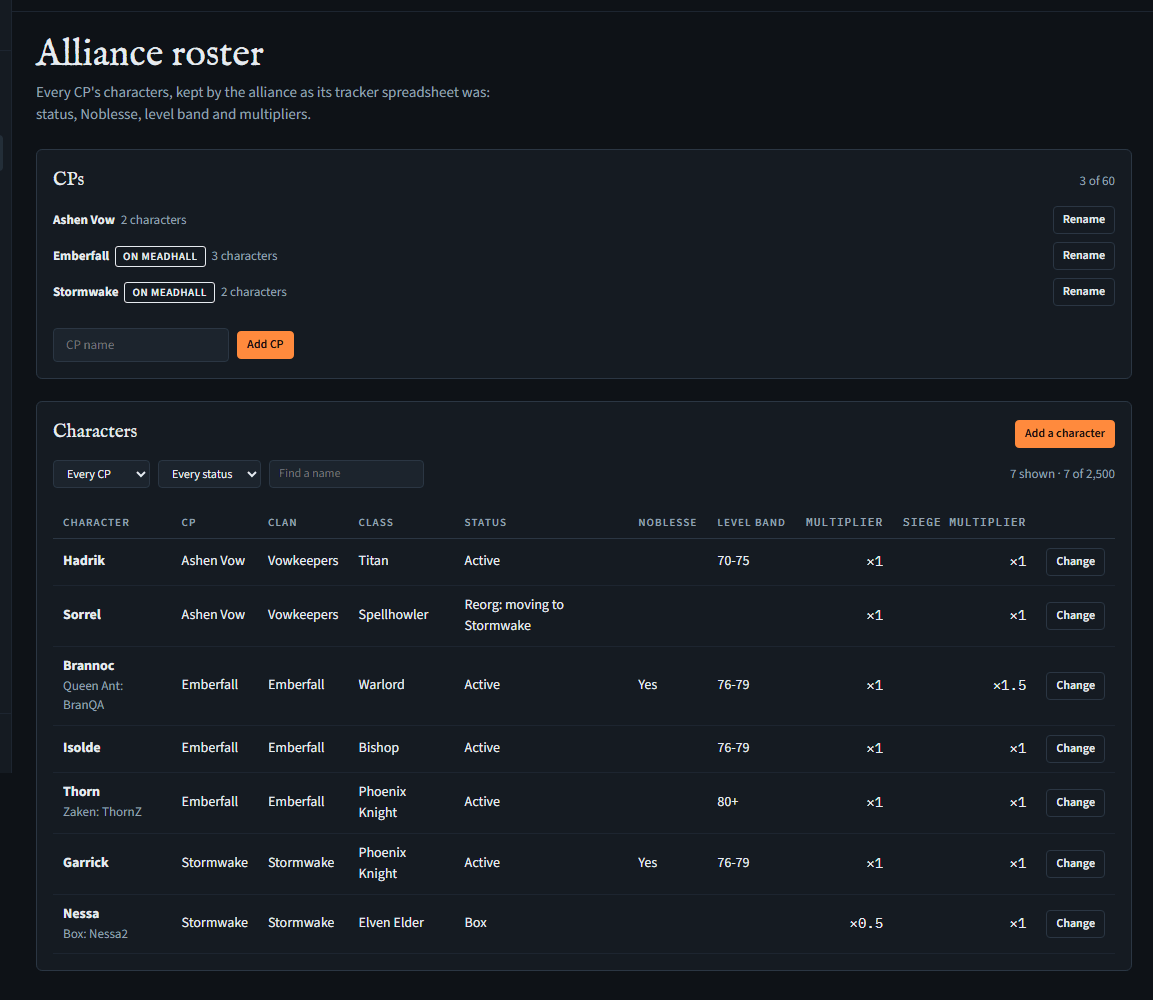
An alliance's Alliance roster page is the alliance's own list of every CP's characters, the way a tracker spreadsheet keeps them. It's separate from the linked roster: that shows what CPs on Meadhall choose to share; this is what the alliance's officers write down themselves, for every CP, on Meadhall or not.
CPs
- Type a CP's name and press Add CP. A group linked under the alliance and not listed yet shows under Linked here, not listed yet: press Add … to list it, marked On Meadhall. Up to 60 CPs, and no two with the same name (whatever the capitals): a second one is refused, saying so.
- Rename changes a CP's name everywhere. Remove shows only for a CP with no characters, and is refused while a character is marked as moving to it, or while one of the alliance's drops names it (as the CP it went to or one that asked for it, voided drops too).
- If a linked CP's link ends, it stays on the list with its characters, marked Link ended.
Characters
- Add a character: its name, CP, its Queen Ant, Zaken and box names if it uses others, clan, class (from the game's list), status, Noblesse, level band, two multipliers and a note. Change on a row opens its form to edit it; Remove from the roster, at the bottom of that form, takes it off (it asks first).
- Status is Active, Inactive, Left, Box, Reorg: kick or Reorg: move; a move names the CP they're going to.
- Multipliers are written like 1 or 1.5 (0 to 10). They apply when the alliance awards points on its Alliance DKP page; changing one changes no points already given.
- Narrow the list by CP or status, or type part of a name (any of its names, or the clan) in Find a name and press Enter.
- If someone else changed a character or a CP while you had the page open, saving or renaming isn't done: the page says so and shows the roster as it is now. Look again, then make your change.
- Up to 2,500 characters. A big roster comes in 250 at a time: the first 250 show at once, and Loading characters: … of … counts the rest in. A CP lead's own CP comes first. Until the count is gone, finding a name or narrowing by CP only looks through the characters in so far. While you're typing in a form or the search box, new characters wait until you're done.
Characters on the roster aren't linked to anyone's Meadhall account: it's the alliance's list, like the spreadsheet was. Names, other names, clans and notes are encrypted with the alliance's key.
CP leads
Making someone a CP lead needs Give and take roles, not being a CP lead yourself, and holding Keep the alliance roster, Import the alliance roster from a spreadsheet, Award alliance DKP to the roster's characters, Keep the alliance's item price list, Record the alliance's drops and who got them and Allocate the alliance's epic jewels if they hold them.
On the alliance's People page, Roles… on a member shows CP lead for: pick one of the alliance's CPs and press Save (No CP: every CP ends it). Their row then says Leads ….
- A CP lead's Keep the alliance roster reaches only that CP: they add characters to it, change or remove its characters, and can mark one as moving to another CP. They can't touch another CP's characters, move a character into or out of their CP, change multipliers (the alliance's officers set them: a CP raising its own would raise its share of every drop), or change the CP list. The Alliance roster page shows them only those controls: Change on their CP's rows, Add a character for their CP, and the multipliers greyed out ("The alliance's officers set multipliers.").
- They still see every CP's characters, as everyone in the alliance does.
- If they also hold Import the alliance roster from a spreadsheet, they import only their own CP's rows, without multipliers, and undo only those. They can't import the alliance's DKP, or its prices and drops, whatever they hold: an officer of the whole alliance does.
- If they hold Award alliance DKP to the roster's characters (Officer holds it to begin with), they award and adjust points only for their own CP's characters, and reverse only awards they made themselves (never a decay) whose characters are all still in their CP. Within their CP nothing caps what they award: every line is kept and shown with who gave it, and that is the check. (A CP lead who is also an Officer still sets up the DKP pools and activities.) The Alliance DKP page shows them ticks on their own CP's characters only, and Reverse only on those awards.
- If they hold Keep the alliance's item price list (Officer holds it to begin with), it does nothing for them: they don't add items or set prices, since prices decide every CP's value received. They still see the price list.
- If they hold Record the alliance's drops and who got them (Officer holds it to begin with), they record a drop only as open, valued from the price list, asking for it for their own CP at most, and ask for an open drop, or withdraw, only for their own CP. Giving a drop, marking it unclaimed or sold, setting its value, changing it and voiding it stay with the alliance's officers who aren't CP leads (Drops).
- If they hold Allocate the alliance's epic jewels (Officer holds it to begin with), it does nothing for them: which CP gets an epic jewel, and how many of its top performers' points move, is for the alliance's officers who aren't CP leads.
- A CP lead can't make anyone a CP lead, and can't give, take or edit a role that holds Keep the alliance roster (Officer holds it to begin with), Import the alliance roster from a spreadsheet, Award alliance DKP to the roster's characters, Keep the alliance's item price list, Record the alliance's drops and who got them or Allocate the alliance's epic jewels, so nobody gets more reach from them than they have.
- Leaders lead the whole alliance and can't be a CP's lead: making a CP lead a leader sets their CP aside, and it counts again if they step down. A CP someone leads can't be removed until that changes.
- Being a CP lead stays with the person: leaving the alliance and coming back (with a code, a request or from Discord) keeps them their CP's lead, whatever roles they get back. So does deleting their account and coming back with the same Discord account, whether they sign in with it or link it later: the alliance keeps the record, and puts it back when they join, link Discord, or are given a role. Only someone who can make CP leads changes it, while they're a member.
- Leading a CP in the alliance is separate from leading the CP's own group on Meadhall: being a CP group's leader gives nothing in the alliance.
Importing from a spreadsheet
Needs Import the alliance roster from a spreadsheet and Keep the alliance roster (leaders, unless they give both to a role). A CP lead imports only their own CP's rows.
Importing is part of the alliance roster, so it needs the alliance on the Alliance plan (or a founder code's 90 days), as the roster does: on any other plan the Import page, and undoing an import, say it isn't on the group's plan (Plans).
- In Google Sheets, open the tracker's roster tab and choose File, Download, Comma-separated values (.csv).
- In the alliance: Settings, Import from a spreadsheet, Open Import, then Pick a CSV file.
- Check the Header row (the first row with a column called Name or Character, or choose another), then Which column is which: Meadhall guesses from the headers (Name or Character, QA, Zaken, Box, Clan, CP, Class, Status, Noble, Level, Multiplier, Siege multiplier), and you can change any of them or leave a column out. Then each CP and status the file writes: a CP the alliance already lists is matched by name, any other is added as a new CP unless you choose otherwise; Leave these rows out skips them. A status like REORG - Move to Embers is read as a move to that CP: CPs moved to in the file matches each such CP the same way (a CP lead can match it to any CP the alliance lists). Blank status cells show as (blank): choose a status for them, or leave them out.
- The preview says how many rows go in, how many are left out and why, which classes it didn't recognise, and shows the first ten. Press Import ….
- The file is read in your browser and never uploaded: only its rows are sent, 96 at a time, one CP at a time. Meadhall keeps the file's name, encrypted, to recognise it. Files over 5 MB, or with a name over 120 characters, aren't read.
- Each line of a file, for a CP, lands once. Importing the same file again, or pressing Try again after a failure, adds only lines not there yet. A changed file of the same name brings in only lines that weren't imported: to bring changes in, undo the first import, then import again. A line you removed from the roster by hand comes back if you import its file again, and so does a line you map to another CP the next time. Two CPs' files of the same name are separate: each CP's lines land.
- A row the roster refuses (a name too long, a multiplier from a CP lead) is listed with its line; the others still go in. A class Meadhall doesn't know is left blank. Imported rows follow every rule a typed one does, the limit of 2,500 characters on the roster (one row each) included.
- Imported files lists each import with how many of its rows are still on the roster. Undo takes them all off, changed since or not (it asks first; a CP lead's undo takes only their CP's). CPs the import added stay on the list.
Importing the alliance's DKP
Needs Import the alliance roster from a spreadsheet and Award alliance DKP to the roster's characters (leaders, unless they give both to a role). A CP lead can't import the DKP or undo its import, even holding both: a backdated balance for their own CP is something no single import can show to be wrong, so it's left to the alliance's officers.
Import the roster first: each line of the points tab is matched to a character on it by name. Then download the tracker's points tab as CSV the same way, and on the Import page, under The alliance's DKP, press Pick a CSV file. Meadhall reads every character's name from the roster before the preview is complete (a few seconds for a big roster); Import … waits for it.
- Running totals (the tracker's own shape): a line per character, with a column of points for each pool. A column whose header is a pool's name (Queen Ant, Zaken …) is read as that pool's points, or choose it under Which column is which. Each character's points in each pool come in as one Imported opening balance, dated the day you choose under Date for every line (today; for a file imported before, the date, reason and pool it was sent with). An empty or 0 cell gives nothing.
- A line per award: columns such as Name, Pool, Points, Date and Reason. Lines with the same pool, date and reason are one award in the ledger. Whatever the file doesn't have (a pool, a date, a reason) is chosen once for every line.
- Points are imported exactly as written: the tracker's totals already include each character's multiplier, so none is applied again (a sheet of points before the multiplier isn't imported: work the multiplier in first). Points can be written like 1.5, 1,5 or 1,234: up to 100,000 in an opening balance, and 1,000 in a line per award (as in an award).
- A name is matched to the character with that name, ignoring case; a name no character has is tried against the Queen Ant, Zaken and box names. A name that isn't on the roster, or fits more than one character, is left out, and the preview counts those lines.
- Imported lines are marked Imported on Alliance DKP and count like any other points (a Left character's still don't count toward its CP).
- Each line lands once: importing the same file again, or Try again after a failure, adds only lines not there yet (the page offers the date and reason the file was sent with before: keep them). A character gets one imported opening balance per pool: while one stands, another (the same file on another date, or a copy under another name, such as a second download saved as … (1).csv) is refused for them and listed with its line. To bring a changed file in, undo the first import, then import again. While one member's import of a file is unfinished, another member importing a file of the same name is refused for those awards: they finish it, or a leader undoes it.
- Imported files lists the import with how many of its lines are still in the ledger. Undo reverses them all: each character gets the opposite amount, as new lines, nothing deleted. A big import takes a few requests to undo; the page carries on until it's done (if it stops, press Undo again: until it's finished, the file can't be imported). After an undo the same file can be imported again. If you reversed a file's awards on Alliance DKP instead, Undo is still offered (with nothing left to reverse) so the file can be imported again. If someone undoes a file while another member is still importing it, the rest of that import is refused: pick the file again.
Importing prices and drops
Prices need Import the alliance roster from a spreadsheet and Keep the alliance's item price list; drops need it and Record the alliance's drops and who got them (leaders, unless they give them to a role). A CP lead can't import either, or undo their import, even holding both: prices and drops decide every CP's value received.
- Prices first: download the tab of item values as CSV and pick it under The item price list. Map its columns (item, type, epic, value, and the day each price starts, or one day for the whole file under Every price starts on). An item not on the list yet is added with the type and epic the file gives it; one already there keeps its own. A price the list already has on that day is left as it is: the same value counts as already there, another is listed as refused, so an import never overwrites a price someone set.
- A tab with old and new values is imported twice: once with the old column and the day it started, once with the new.
- Then each epic's drops tab, under A drops tab: choose The tab's epic, match each item to the price list (or, holding Keep the alliance's item price list, add it there) and each CP name to the alliance's CPs (or leave it out). A drop is given when Given to names a CP (assigned when that column is ticked, else claimed), unclaimed when Unclaimed is ticked or it sold, and open otherwise. A drop with a value in the file keeps it, marked as set by hand; one without takes the price list's on its day, so import the prices first.
- Values and sales can be written as on the price list: 1,500,000 or 1.5kk. A line the page can't read (no item, no day, a value that isn't adena, a drop given to a CP you left out) is counted and left out before anything is sent; a line the alliance refuses is listed with its line, and the others still go in.
- Each line lands once: sending a file again, or Try again, adds only what's missing. A drops line is remembered by the file's name, its epic and its line, so the same tab imported for two epics lands twice, once in each. A changed file of the same name brings in only lines that weren't imported: undo the first import, then import again.
- Imported files lists each import with how many of its prices or drops are still there. Undo takes a prices file's prices away (one set by hand since stays), then the items it added that no price or drop names; it takes a drops file's drops away, changed since or not. Undo the drops before the prices they name. A big import takes a few requests to undo; the page carries on until it's done.
Alliance DKP
Seeing it needs See the alliance roster (every starter role) or Award alliance DKP to the roster's characters; awarding needs Award alliance DKP to the roster's characters (Officers, unless leaders change that). Pools and activities are set on the alliance's DKP page, under Rules (Set up DKP pools and activities).
The Alliance DKP page keeps points for the characters on the alliance roster, in the alliance's own pools: one per epic (Queen Ant, Zaken, Baium …). It's separate from the standings on the DKP page, which are for members with Meadhall accounts, and from points from linked groups. Pools and activities at the top opens the DKP page, where they're set.
CP totals
- The characters come in as on the Alliance roster, 250 at a time (a CP lead's own CP first), counted in under Characters; until they're all in, the list and the ledger's names are only of those loaded so far.
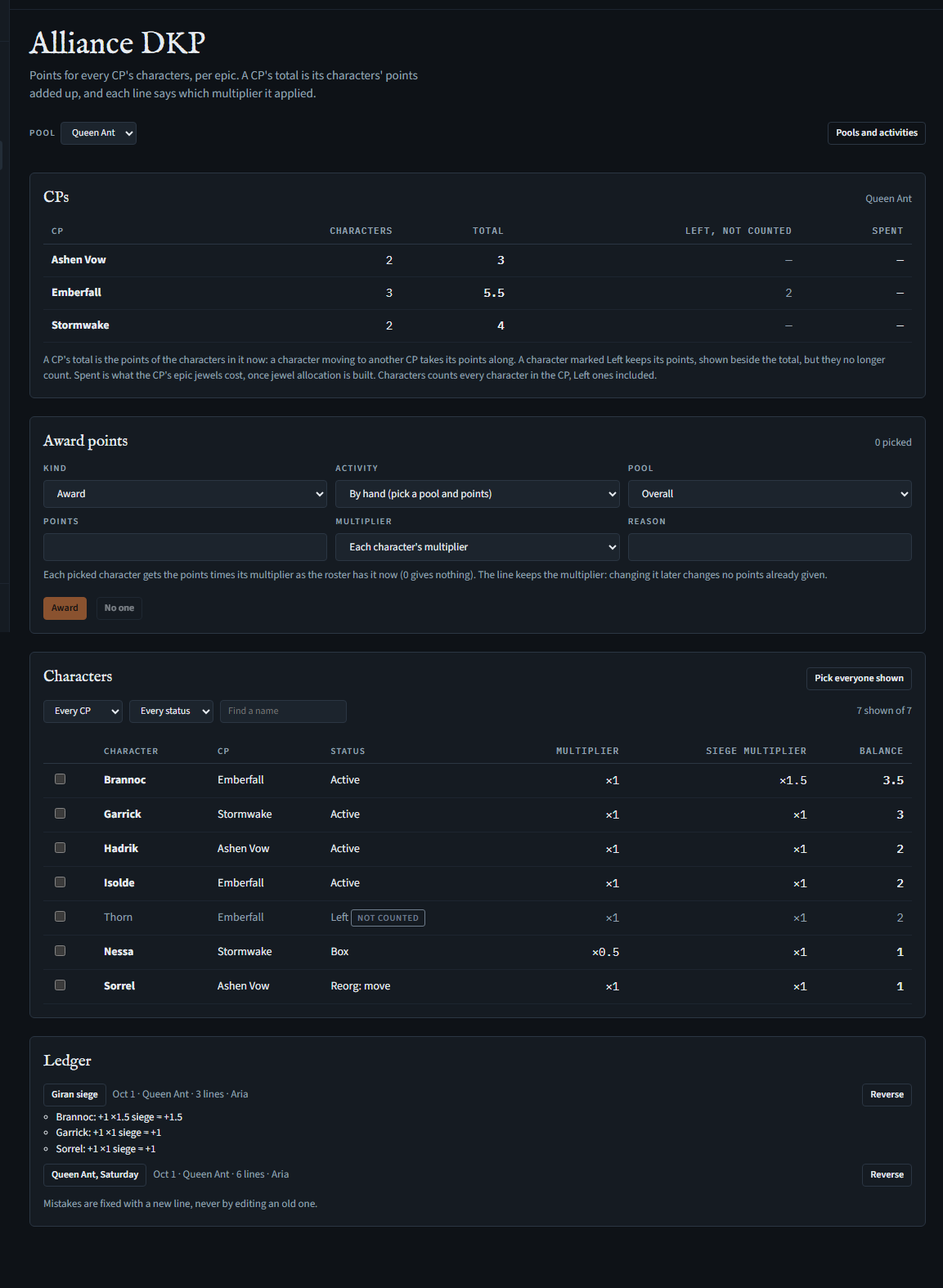
- Pick a pool at the top. CPs shows each CP's number of characters (Characters, Left ones included), their points added up (Total), the points of its characters marked Left (Left, not counted), and its Spent line: what the CP's epic jewels cost, the points of its top performers moved there by each allocation (— while it has none). Spent lines are only read here: nothing on this page writes or reverses them. On the ledger an allocation's line reads Moved to Spent: the item, with Its allocation beside it, which opens it on the Epic jewels page; undoing the allocation there is the only way back (Back from Spent).
- A CP's total is the points of the characters in it now: a character moving to another CP takes its points along. Every status counts except Left: a character marked Left keeps its points, shown greyed on its row with not counted, but they no longer count toward its CP.
- A character with DKP lines can't be removed from the roster, so its lines keep its name: set its status to Left instead.
Awarding points
- Tick characters under Characters. The list starts on Active characters; narrow it by CP, status or name (Every status shows them all, Left ones greyed). Pick everyone shown ticks the whole list, and No one clears the ticks.
- Under Award points, pick an activity, or By hand with a pool and points, and the Multiplier: each character's, each character's siege multiplier, or none. The form says how many points that makes in all.
- Press Award.
- Each character gets the points times its multiplier as the roster has it then, to two decimals: 1 point at ×1.5 is 1.5. A multiplier of 0 gives nothing. The ledger line keeps the multiplier ("+1 ×1.5 siege = +1.5"), so changing a multiplier later changes no points already given.
- An Adjustment is for one character, plus or minus, with a reason and no multiplier.
- More than 300 characters go in parts of one award. If a part fails, press Award again without changing the form: nobody already paid is paid twice. Changing the points, pool, multiplier, activity or reason first makes it a new award: if an award only partly landed, check the ledger before sending it again with other details, or the characters already paid are paid again.
- If a character moved to another CP or left the roster, or the pools changed, while you had the page open, the award isn't made: the page says so and shows the alliance as it is now. Look again, then award.
- Ledger lists each award, newest first; press its name to see every character's line. Reverse gives everyone in it the opposite amount, as a new line: nothing is edited or deleted. Older shows more. Awards imported from the tracker are marked Imported; to take a whole import back, use Undo on the Import page. A very big award (an imported opening balance for every character) is reversed a part at a time: the page carries on until it's done; if it stops, the award shows Reversing: not finished and Finish reversing.
- If the alliance's DKP has weekly decay, characters' points decay with it. Spent lines never do.
A CP lead holding the permission sees ticks only on their own CP's characters, and Reverse only on awards they made themselves (never a decay) whose characters are all still in their CP. They can't change multipliers, so their awards give their characters what anyone's would.
Item prices
Seeing it needs See the alliance roster (every starter role), Keep the alliance's item price list or Record the alliance's drops and who got them; changing it needs Keep the alliance's item price list (Officers, unless leaders change that), and not being a CP lead.
An alliance keeps a price list: what each item is worth in adena, from a day on. Open Prices in the alliance's menu. A whole tab of item values can be imported from the spreadsheet.
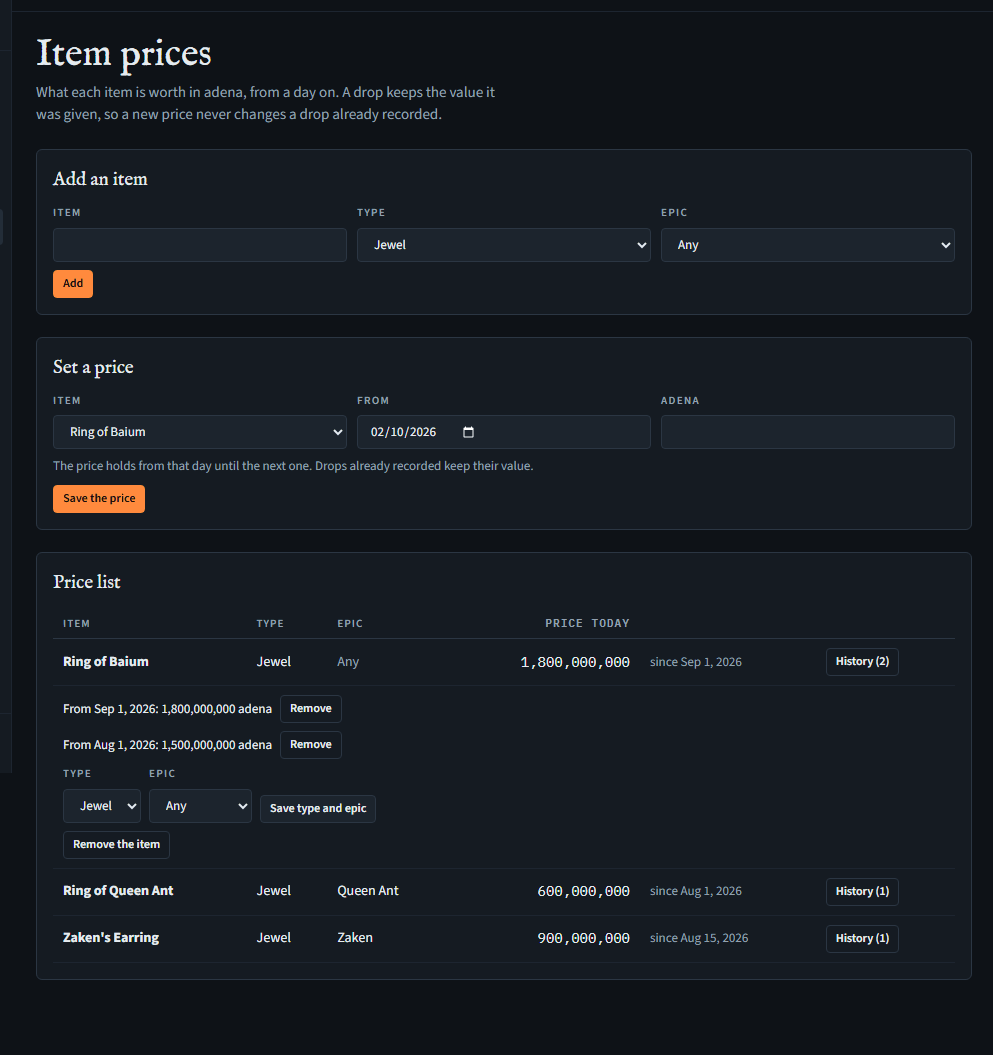
- Items are named as the game spells them: the box suggests names from the server's item list. Each has a type (jewel, book or other) and, if you like, the epic it drops from; both can be changed later under History on its row (Save type and epic). An epic an item names can't be removed from the alliance's DKP pools until the item names another (or none), nor can one that any of the alliance's drops is in (voided ones too).
- A price starts on a day and holds until the next one. When an item's value changes, set a new price from that day: the old one stays in the item's history (History on its row). Adena can be written 1,500,000 or 1.5kk.
- A price can be corrected (set again for the same day) or removed. A drop keeps the value it was given (see Drops), so changing the list never changes a drop already recorded.
- An item can be removed with its prices, unless a drop names it. An item's name can't be changed: remove one added misspelt and add it again.
- Everyone who can see the alliance roster can see the prices. People holding Keep the alliance's item price list (Officers, by default) add items and set prices. A CP lead doesn't, even holding it: prices decide every CP's value received.
Drops
Seeing it needs See the alliance roster (every starter role) or Record the alliance's drops and who got them; recording needs Record the alliance's drops and who got them (Officers, unless leaders change that).
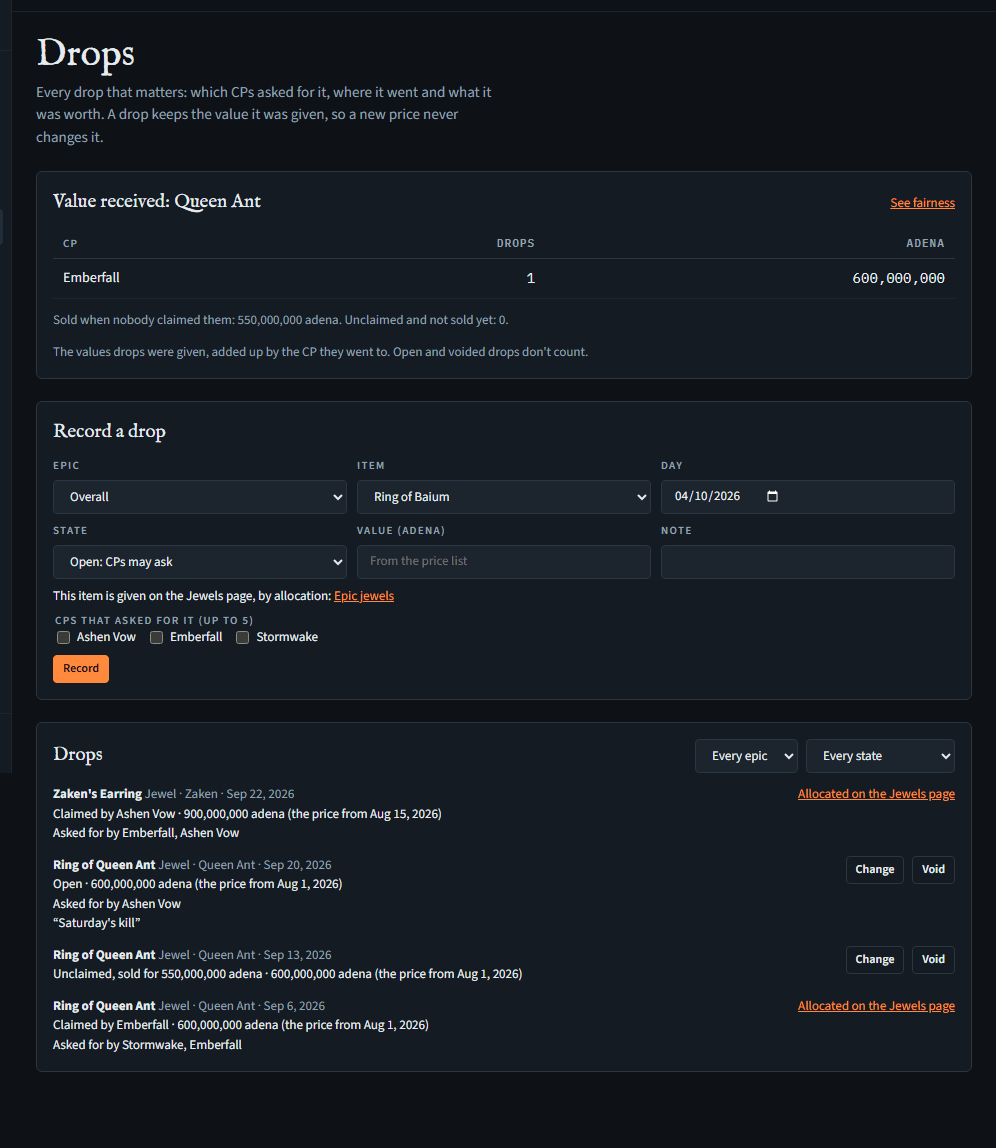
The alliance's drops, as its drops tabs kept them: which CPs asked for each, where it went and what it was worth. Open Drops in the alliance's menu. Each epic's drops tab can be imported from the spreadsheet.
Recording a drop
- Under Record a drop, pick its epic (one of the alliance's DKP pools), an item from the price list (the epic's own items first, then those for any epic) and the day it dropped, and press Record. With nothing on the price list yet, the page sends you there first.
- A drop is open while CPs ask for it (up to five), given once it goes to a CP (claimed from the pick, or assigned by the officers), or unclaimed when nobody takes it; an unclaimed drop says what it sold for once it's sold. A drop can be recorded in any of them at once, for one from before Meadhall, with the CPs that asked for it ticked.
- Its value is the item's price on its day, from the price list, and the drop keeps it: a new price, or one corrected later, doesn't change it. Each drop says which day's price it took, or that it has no price for its day. An officer can type a value instead, which the drop marks as set by hand.
- Change on a drop opens it: its state, who it went to and how, what it sold for, its day, value, note and the CPs that asked. Use the price list there takes the price again for its day, for a value set by hand or a price added since. Moving a drop to another day takes that day's price, unless its value was set by hand.
- An item that goes through epic jewel allocation in the drop's epic (its jewels and books, unless the alliance chose otherwise there) isn't given here: the forms don't offer Given for it, and say it's given on the Epic jewels page. A drop given that way shows Allocated on the Jewels page instead of Change and Void: undoing the allocation is how it's taken back, its points with it. One given before allocation existed, or imported, stays with its CP; its note, day and value can still be changed. The drops import still brings them in as given, as history.
- A drop isn't deleted, except by undoing the import that brought it. One recorded by mistake is Voided, with a reason: it's kept, counts for nothing and can't be changed again. Voided in the list's state filter shows those.
- The list shows the newest drops first, by epic and state; Older drops shows more.
Value received
On top, each CP's value received in an epic (the one picked in the list's filter, or the first with drops given): how many drops went to it and their values added up, with any of them that had no price said beside it. Below, what the epic's unclaimed drops sold for, and how many aren't sold yet. Open and voided drops don't count. Drop fairness sets this against each CP's share of the epic's DKP; See fairness on the card opens it. A drop doesn't spend DKP.
Who does what
- Everyone who can see the alliance roster can see the drops.
- People holding Record the alliance's drops and who got them (Officers, by default) record drops, give them, mark them unclaimed or sold, set values, change them and void them.
- A CP lead holding it records a drop only as open, valued from the price list, asking for it for their own CP at most, and on an open drop presses Ask for it, or Withdraw, for their own CP only. Giving it is the alliance's officers'.
- A CP or an item a drop names stays: it can't be removed while the drop is there, voided or not.
Drop fairness
Seeing it needs See the alliance roster (every starter role), Award alliance DKP to the roster's characters or Record the alliance's drops and who got them. Nothing on it is set by hand: it's worked out from the alliance's DKP and its drops each time the page is opened.
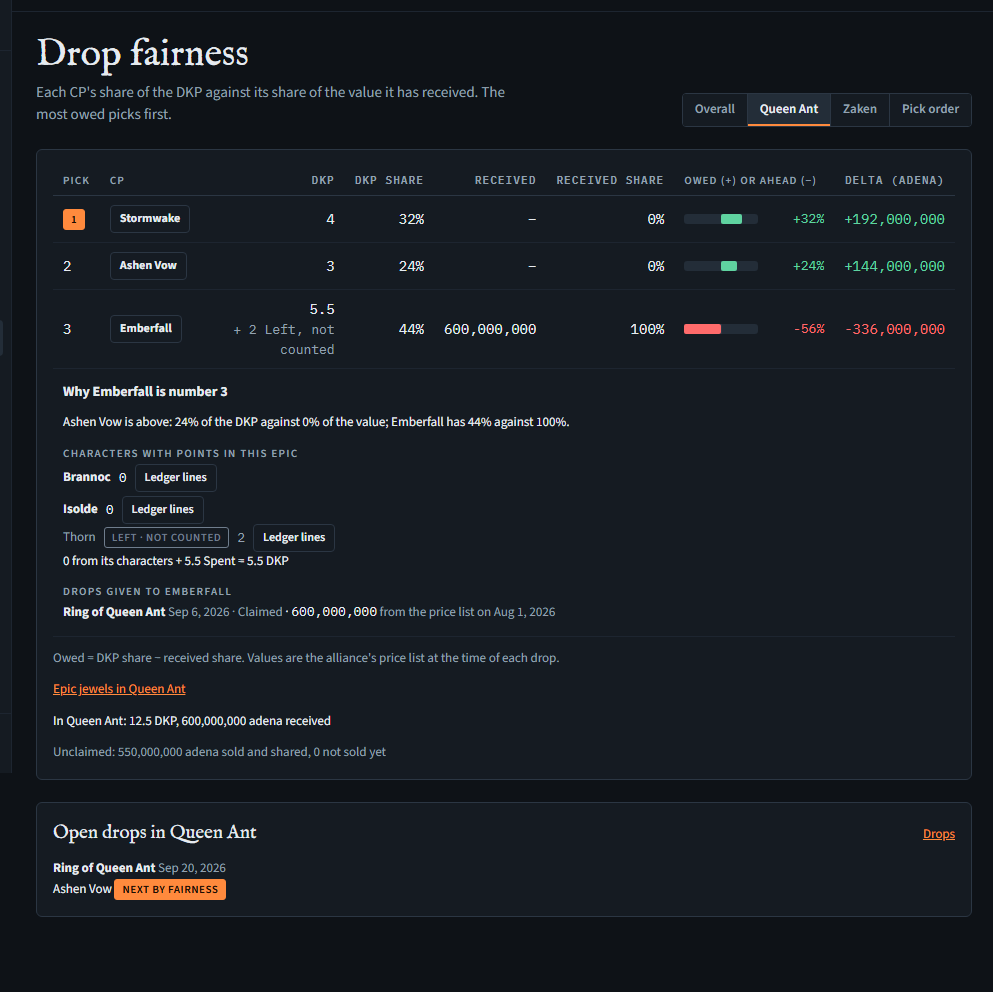
For one epic at a time, Drop fairness sets each CP's share of the epic's DKP against its share of the value it has received from the epic's drops: the CP most owed picks first. Open it in the alliance's menu, and pick an epic at the top; it opens on the first epic with a drop given to a CP.
The table
- DKP is the CP's total in the epic as Alliance DKP shows it: the points of its characters, Left ones not counted (shown under the number, as + 2 Left, not counted), plus its Spent line (what its epic jewels cost). DKP share is that out of all the CPs' DKP in the epic; a CP below 0 counts as 0.
- Received is the values of the epic's drops given to the CP, added up as on the Drops page: claimed or assigned alike, each at the value it was given. A drop with no price on its day counts as a drop worth 0, and the row says how many (1 unpriced). Received share is that out of all the value the epic's drops have given to CPs.
- Owed (+) or ahead (−) is the DKP share minus the received share, in percentage points, drawn as a bar: green for owed, red for ahead.
- Delta (adena) is the same in adena: the CP's DKP share of all the value given, minus what it has received. Pick is the order by Delta, highest first.
- When Deltas are equal, the higher DKP share goes first, then the CP with fewer drops from the epic, then the CP's name. So before any drop has a value, every Delta is 0 and the order follows DKP share; with no DKP in the epic yet, the CP that has received least goes first.
- Every CP on the alliance's list is in the table, with 0 where it has nothing in the epic. If you lead a CP, its row is highlighted.
- Under the table: the epic's DKP and value received in all; what its unclaimed drops sold for, and how many aren't sold yet (sold adena are shared, not received by one CP, so they're in nobody's Received); and, when any drop has no price, a link to the epic's drops on the Drops page, where an officer can set one (Use the price list, or a value by hand). The order may change once they're priced.
- It counts all the epic's history, imported included, and the characters' points as they are now: a character that moved CP counts for its new CP, and drops stay with the CP that got them. A change made elsewhere shows the next time the page is opened.
Why a CP is where it is
Press a CP's name in the table to see what its numbers are made of, under its row:
- How it compares with the CPs either side: each one's share of the DKP against its share of the value.
- Characters with points in this epic, each with its points, the Left ones apart and marked not counted; then the sum: the characters' points, plus the Spent line, make the DKP in the table.
- Ledger lines on a character shows its lines in the epic from the alliance's ledger, each award with its multiplier, so a balance can be checked line by line. When a character has more than one read shows (200 awards), the older ones are on the Alliance DKP page's ledger. (Someone holding only Record the alliance's drops and who got them sees the points without the button.)
- The drops given to it in the epic: the item, the day, claimed or assigned, and its value, from the price list on which day or set by hand, or No price on its day. They add up to its Received.
- The drops of the epic it asked for that went to another CP, or that nobody claimed.
Open drops
Each open drop in the epic, with the CPs that asked for it in pick order: the first is marked next by fairness. The page only shows this; the officers give the drop on the Drops page, which the card links to, or, for a jewel or book that goes through allocation, on Epic jewels, which the link under the table opens on the same epic.
In Discord, /fairness links to this page; see the bot's page.
The pick order by period
Seeing it needs what the rest of the page needs. Opening, closing and reopening a period needs Record the alliance's drops and who got them (Officers, by default), and never a CP lead's: closing sets every CP's share of the adena.
Pick order, after the epics at the top of the page, is the alliance's pick order for a period, as the spreadsheet's period tabs kept it. A period runs from a day the officers pick until they close it; closing one opens the next from the day after.
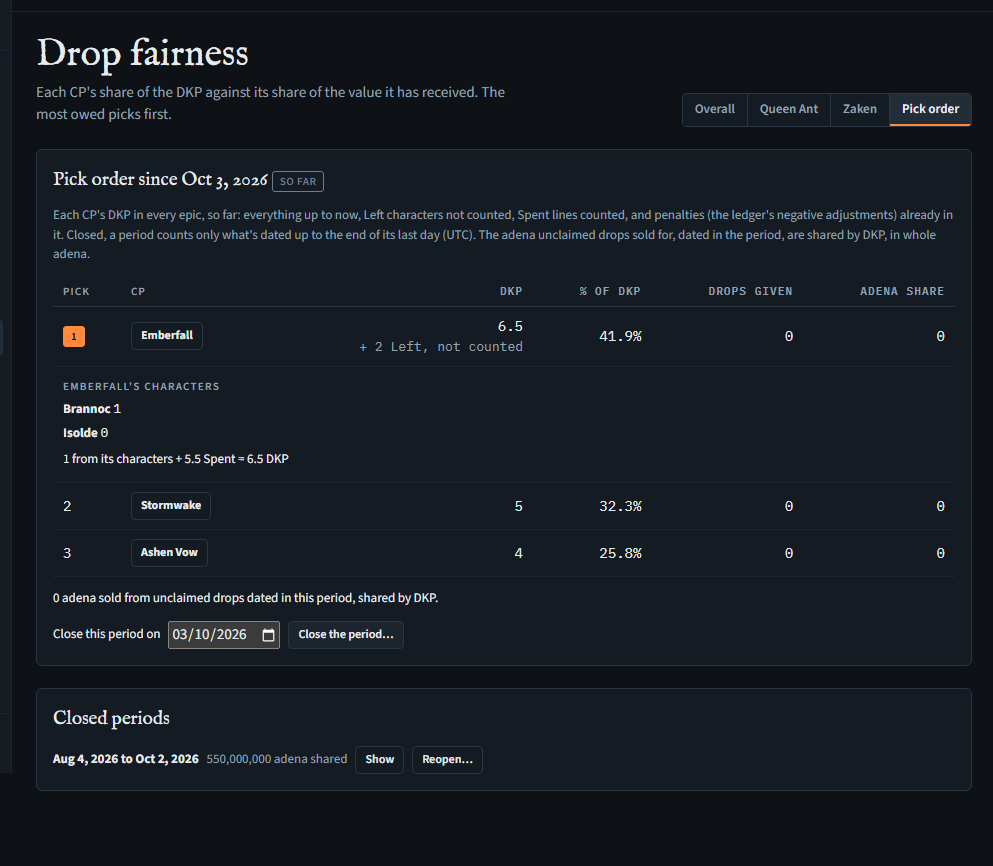
- DKP is each CP's DKP in every epic added up. For the open period it's so far: everything up to now. For a closed period it's exactly what's dated up to the end of its last day (UTC), each award by its time, an imported line by its sheet's date. Either way, as in the epic tables: its characters' points with Left ones not counted (shown under the number), plus its Spent line. Penalties are the ledger's negative adjustments, so they're in it already. Pick is the order by DKP, highest first; when two CPs have the same, the one with fewer drops given in the period goes first, then the CP's name. A CP below 0 has 0%.
- % of DKP is the CP's DKP out of all the CPs'.
- Drops given is how many drops (every epic) went to the CP with a day in the period (up to today, for the open one: a drop dated tomorrow counts from tomorrow).
- Adena share is the CP's % of the adena the period's unclaimed drops sold for (drops whose day is in the period, as recorded on the Drops page), in whole adena: the adena left over from rounding go one each to the CPs with the largest remainders, so the shares add up to the total. Nothing here marks a share as paid.
- Press a CP's name to see its characters with their points (every epic added up), and the sum: the characters' points plus the Spent line make its DKP.
Before the first period, someone who may opens it from a day (in the past, if the alliance's period began earlier) with Open the period. To close the open one, pick its last day (today or earlier) under the table and press Close the period…. The period then shows closing: Meadhall reads the alliance's whole DKP ledger, checking it as it goes, and adds up each character's lines dated up to the end of that day, which takes a minute or two (the page looks again by itself). Then it keeps the period's table: each CP's DKP, %, drops and share, and each counted character's points up to that day (by the roster's id, not the name), and opens the next period from the day after. Which CP a character counts for, and whether it's Left, is the roster as it is when the close is worked out. A closed period's numbers never change after: later points, drops and moves change nothing in it, and a sale recorded later for a day inside it stays out of its shares (and out of every other period's). It keeps ids and numbers, not names: its CPs and characters are named as they are now, so a CP or character renamed since shows its new name, and one removed since shows as (a CP removed since) or (a character removed since), with its numbers as they were.
If the close can't finish, the period stays open and says why: the ledger failed its integrity check (Meadhall is alerted), DKP kept being written while it was read, it took too long, or the close couldn't be started. Close it again when you're ready. A close still closing after 15 minutes can be sent again. While a period is closing it can't be closed on another day, and the period before it can't be reopened. Once a period is closed on today, the next one starts tomorrow and can be closed from then.
Closed periods lists the earlier periods with the adena each shared; Show opens a period's kept table. The latest closed period can be reopened (Reopen…), for a period closed by mistake: its kept numbers go, and the period opened after it is removed. No other closed period changes.
Epic jewels
Seeing it needs See the alliance roster (every starter role), Award alliance DKP to the roster's characters, Record the alliance's drops and who got them or Allocate the alliance's epic jewels. Allocating, undoing and the settings need Allocate the alliance's epic jewels (Officers, unless leaders change that), and not being a CP lead. Breaking a rule is the alliance's leaders' alone.
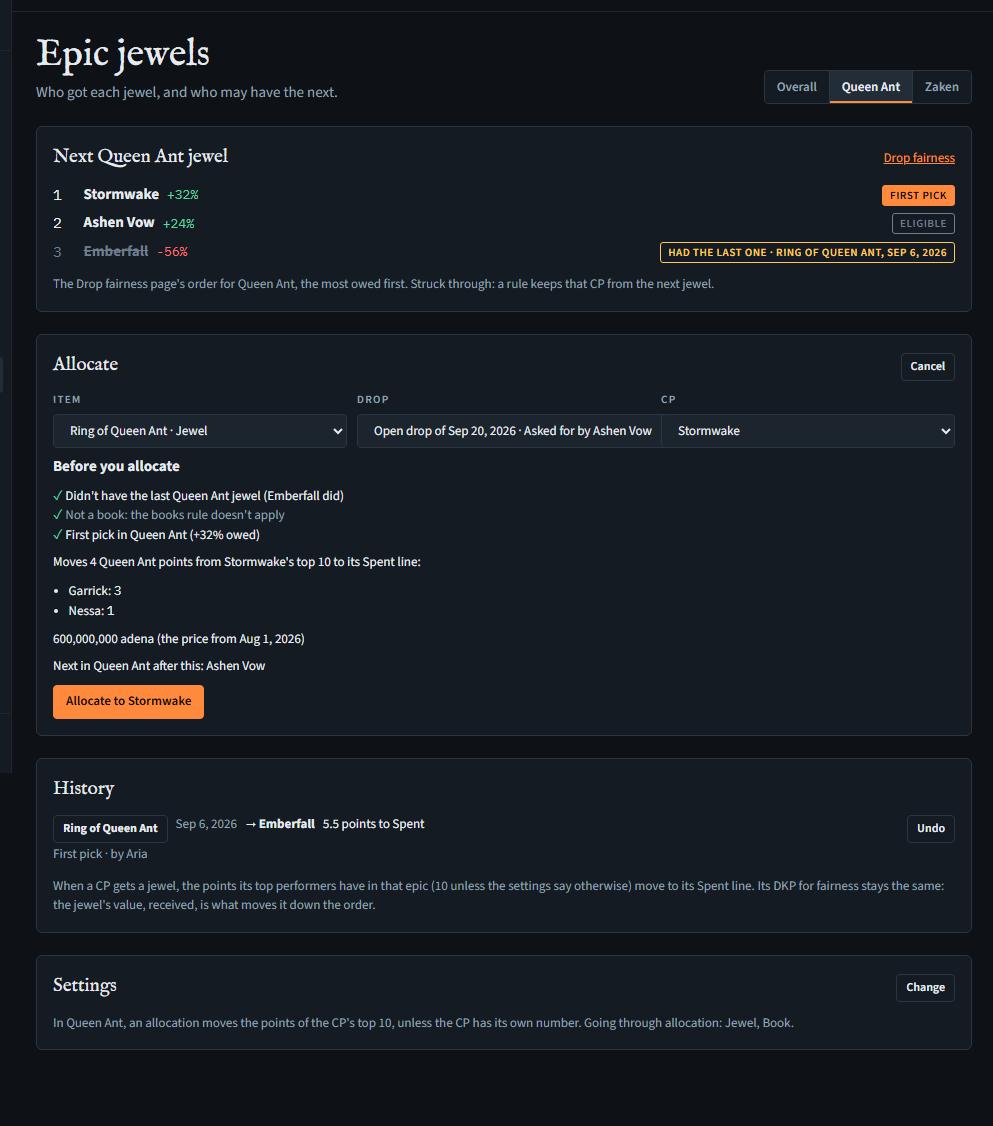
Who gets the next jewel of an epic, checked against the alliance's rules, and what each one cost. Open Epic jewels in the alliance's menu, and pick an epic at the top; it opens on the first epic after Overall.
The order and the rules
- Next jewel lists the CPs in the Drop fairness order for the epic, the most owed first, each with how much it's owed (+) or ahead (−); the link beside it opens Drop fairness on the same epic, where each CP's place is explained.
- Not the same epic's jewel twice in a row: the CP that got the last jewel of this epic can't get the next one. It's struck through, marked Had the last one, with that allocation's item and day.
- Not two books in a row: the CP that got the alliance's last book, in any epic, can't get the next book. A book doesn't count for the jewel rule, nor a jewel for the book rule.
- Both rules read every allocation that wasn't undone, however old, ordered by the drop's day.
- First pick is the first CP no rule excludes; the others are marked Eligible. If a rule excludes every CP, the page says so: only a leader can allocate then.
Allocating
- Press Allocate. Pick the Item (the epic's items that go through allocation), the Drop: one of the epic's open drops of it (with the CPs that asked), or A new drop, on a day, and the CP. The CP starts as first pick (for a book, the book's first pick).
- Under Before you allocate, the page shows what it will do, read again at each choice: each rule, ✓ or ✗ for that CP; whether it's first pick; how many points move to the CP's Spent line and whose (named, with their points); the jewel's value, from the price list on its day (or a box to type it, when there's no price that day); and who would be first pick next.
- Giving it to a CP after first pick asks for a reason; it's kept with the allocation and shown in its history, with how many CPs it skipped.
- For a CP a rule excludes, a leader sees Break the rule, and gives a reason; it's kept with the allocation, which says which rule was broken, by whom and why. Others are told only a leader can. A rule is broken on the site only.
- Press Allocate to the CP. The jewel becomes one of the epic's drops, given to the CP (claimed when it was first pick, assigned otherwise), at its value.
- What lands is what you saw. If first pick or the points to move changed since the preview (an award, a drop given, another allocation), nothing is allocated: the page shows the new preview, to check and send again.
- If first pick changed at the very moment you allocated (something else landing at the same time), the allocation is kept but marked First pick changed while allocating, and its drop assigned.
- Pressing Allocate to again after a failed send doesn't allocate twice.
What moves
- The CP's top performers in the epic move all their points in its pool to the CP's Spent line, so each goes to 0: the characters in the CP now, every status but Left, with points in that pool, highest first (ties by name). How many is the epic's number in the settings, 10 unless set; fewer with points moves what there is, and none moves nothing (the jewel is still allocated).
- A book moves no points. An item of type other that an epic puts through allocation moves them as a jewel does.
- The CP's DKP on Drop fairness doesn't change: it counts the Spent line, so the points only change places. What moves the CP down the order is the jewel's value, received as its drop.
History and undo
- History lists the epic's allocations, newest first by the drop's day: the item, the day, the CP, the points moved to Spent, how it was picked (First pick, Skipped with the reason, or Rule broken by a leader with the reason) and who allocated it. Press the item to see the characters it took points from, and how many. Older allocations shows more.
- Undo is on the latest allocation of the epic that nothing later was checked against: no later allocation in the epic, and, for a book, no later book in any epic. It asks for a reason. Each character gets back exactly what it gave (one awarded points since keeps them), the Spent line goes down by the same, and the drop is voided, or open again if it was an open drop. The allocation stays in the history, struck through, with who undid it and why.
Settings
Under Settings, for the epic shown, Change sets:
- How many top performers' points move (0 to 20; empty is 10; 0 moves none), and any CP's own number in this epic, used instead of the epic's.
- Which item types go through allocation (jewel, book, other: jewels and books unless changed), and single items set to always or never, whatever their type. Only the epic's own items and items naming no epic are listed: an item another epic names goes through allocation only there.
- An item that goes through allocation in an epic is given on this page only, never on the Drops page.
Everyone who can see the page sees the epic's settings. A CP lead can't change them, since they change what a CP gives up. Not built yet: allocations posted in Discord, and a /jewels command.
Ending a link
Either side can press End the link on Settings, at any time (it asks first). Nothing inside either group changes, except that a CP's members who were in its clan only through the link leave the clan.