 Meadhall
Loot and auctions
The loot log: every drop that matters and where it went. Auctions: members bid on an item, live, in DKP or in the game's own currency.
The loot log
Reading needs See the loot log (every member). CPs, clans, guilds and raid teams have it.
Loot lists the latest 200 drops, newest first (Older under them shows the 200 before): the item, who got it and from where, how it was decided, the DKP paid, the note, and who recorded it. Everyone or a member filters it. Your own drops are marked You.
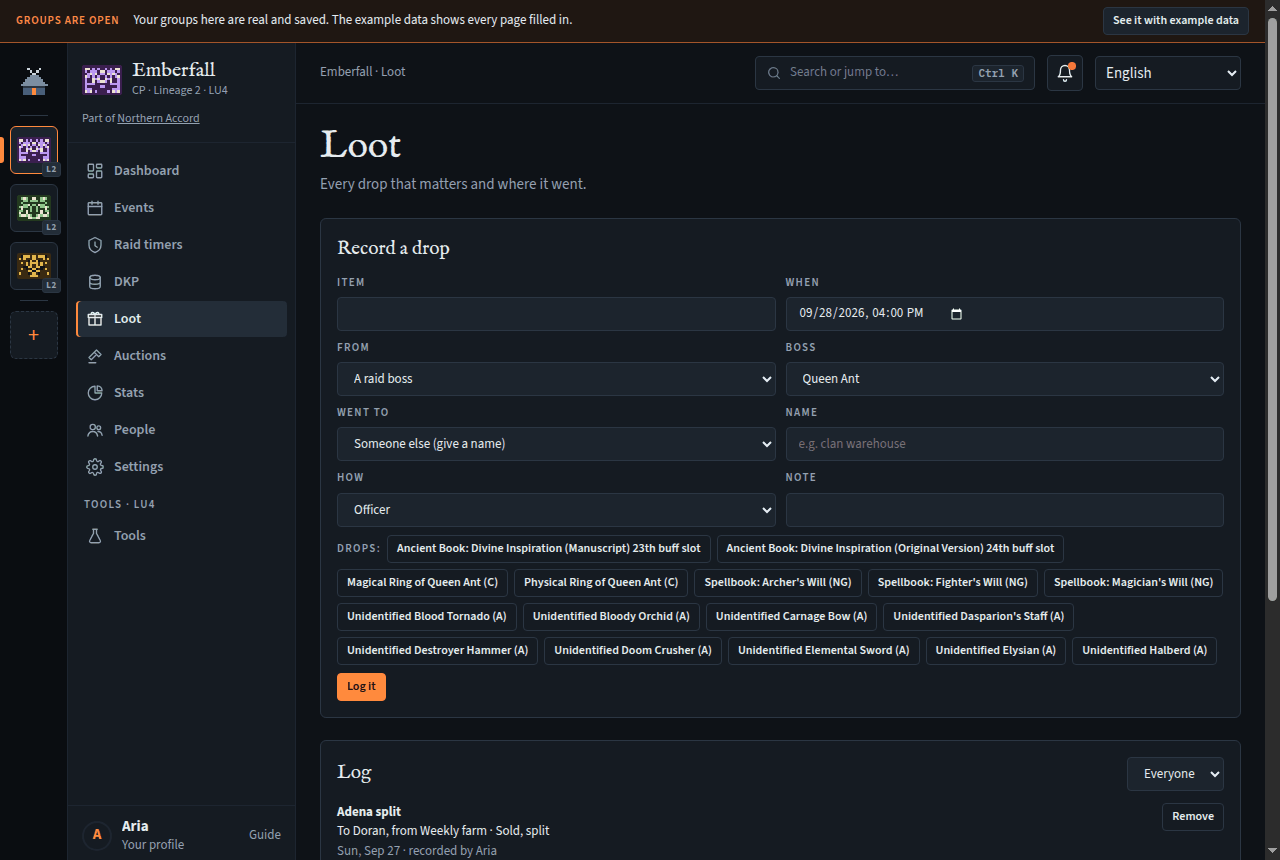
Recording a drop
Needs Log drops and remove loot lines (officers). Selling for DKP also needs Award and adjust DKP, reverse a batch.
- Under Record a drop, type the Item. Suggestions come from the server's item list; pick a boss first and its drops come first, as buttons.
- Set When (within the last 30 days).
- From: A raid boss (pick it), Farming, An event (one of the last two weeks) or Something else, with an optional place. For a World of Warcraft event with soft reserve on, Reserved at this event lists its reserved items: pick one and it fills in the item and sets How to Soft reserve (and Went to, when one member reserved it). Whenever the item is a reserved one, the form says who reserved it: only they roll for it.
- Went to: a member, or Someone else (give a name) such as the clan warehouse.
- How: Officer, Loot council, Rotation, Roll, Soft reserve, Sold, split, Other, or Bought with DKP.
- For Bought with DKP, give the Price (DKP) and the pool. The member must have that much available, or it's refused; the price goes on the DKP ledger as spent.
- In a World of Warcraft group, say which Raid it came from, if any: the form fills it in when it can (from an event's soft reserve, or the raid a picked wisher's list is for).
- Add a Note and press Log it.
From Discord: /loot add, with a preview and Log it.
Removing a line
Needs Log drops and remove loot lines; a line with a DKP price also needs Award and adjust DKP, reverse a batch.
Press Remove on the line and say why. The line stays in the log, struck through with who removed it and why, and any DKP paid for it goes back to the member. This is also how an auction's sale is refunded.
Loot council (World of Warcraft)
A World of Warcraft guild or raid team can give out loot by a council's decision instead of points: on the DKP page's Rules tab, set Loot system to Loot council. A council group has no DKP auctions (gold ones still run, where gold auctions are allowed) and puts no DKP price on loot. Its council is whoever may log drops. New to loot councils? How a WoW loot council works.
Everyone keeps their own wishlist. Only you and whoever may log the group's loot (Log drops and remove loot lines) see it.
- On the Loot page, Wishlist shows one raid at a time: pick it from the menu.
- Add an item for each one you want, up to 20 per raid. Where the raid's loot list has been read from Battle.net, pick the item by boss; for the raids without one, type its name.
- Say how much you want it: Best in slot, Major upgrade, Minor upgrade or Off-spec, and optionally why. Pick the character it's for, then Save. A list stays until you change it; saving an empty one deletes it.
- The council sees Everyone's wishlists for the raid, by item: who wants each one, the keenest first, with their notes. When the council gives an item, record it under Record a drop: once the item is typed or picked, Wished for by lists who wished for it, the keenest first, with their notes and, once the drop's Raid is set, how many items each has received from that raid in the last 8 weeks (hover for which). Someone who has since left the group is shown, but can't be picked. Pick one and it fills in Went to and sets How to Loot council. The loot line keeps who had wished for it, which only the council sees.
Auctions
Needs a paid plan (CP / Raid team, Clan / Guild or Alliance) or a founder code's 90 days (Plans).
On a plan without auctions (Free, say), Auctions says "Auctions aren't on this group's plan." and which plans add them, at the top of the page. A leader gets a See the plans in Settings button to the Plan card; anyone else is told a group leader can change the plan. The auctions stay readable under it, past and open ones, with no listing, bidding or cancelling: an auction still open when the plan ended takes no more bids and closes at its time as usual, the winner paying their bid. Items sold at auction stay on the Loot page too. In Discord, /auction and the bot's auction posts link to this page, the same on every plan.
On CPs, and on World of Warcraft guilds and raid teams. Members bid for an item; the highest bid when it closes wins, and pays. Each auction is in one of two currencies, picked when it opens:
- DKP, from one pool: bids are held against what you have, and the winner pays from the pool. Not in an EPGP or loot council group.
- The game's own: adena in Lineage 2, gold in World of Warcraft. Meadhall doesn't know anyone's adena or gold, so bids aren't checked against anything or held; the winner pays in the game, and the loot log records the price. These run whatever the loot system.
Blizzard bans gold auctions (GDKP) on some realms, so a WoW group on Classic Era, Hardcore, Season of Discovery, Anniversary or Forever auctions in DKP only (loot systems for WoW Forever).
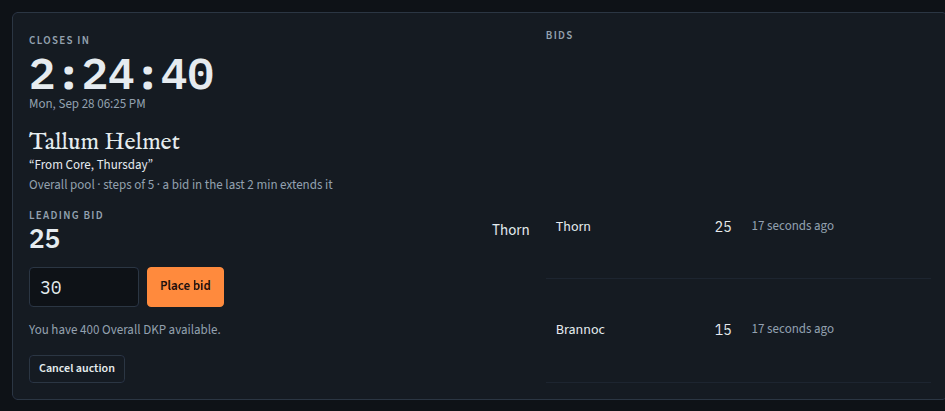
Bidding
Needs Bid in auctions (every member).
- Open Auctions. Each open auction shows how long is left, the item, its pool (or Adena, paid in the game, Gold, paid in the game) and step, the leading bid and the bids so far.
- Your bid is filled in with the lowest bid allowed (the leading bid plus the step, or the minimum). Change it if you like, and press Place bid. "Bid of … placed. You lead." Adena and gold are whole numbers, and take a k for thousands: 1.5kk is 1,500,000.
- In DKP, while you lead, your bid's points are held: you can't use them in another bid or a DKP purchase. Outbid, they're freed. The page shows what you have available and what's held.
- A bid in the last minutes (2 to start with) moves the close later, so nobody wins by bidding at the last second.
- You can't raise your own leading bid, or in DKP bid more than you have available.
In Discord, /auction and the bot's auction post link to this page; bidding is done here.
Opening and cancelling an auction
Needs List items for auction and cancel auctions (officers).
- Under List an item: the Item, when it Closes (1 minute to 14 days away), what it's Bid in (DKP or the game's currency; shown when both are possible), the Pool for DKP, and optionally the Minimum bid, Increment, a Note, and when to Post in Discord (empty: at once). In adena or gold the minimum is 0 and the increment 1 unless you say otherwise.
- Press Open the auction. Up to 50 can be open at once.
- Cancel auction asks first; in DKP the leading bid's points are freed.
Auctions are listed and cancelled here, not in Discord: /auction links to this page.
When it closes
At the closing time, all in one go: the auction closes, the winner's price goes on the DKP ledger as spent (Automatic), and a loot line is written with how Auction. Closed lately lists the last 20: who won and for how much, or not sold, or cancelled. To refund a sale, remove its loot line.
In adena or gold, the auction closes to its winner and price, and the loot line says what it went for (1,500,000 adena). Nothing is charged on Meadhall: the winner pays in the game, to whoever is handing the item over. Removing that line changes no balance.
Auction rules
Needs Set up DKP pools and activities (officers).
Auction rules sets the defaults for new auctions: Minimum bid, Increment, the Anti-snipe window in minutes (0 is off) and how far a late bid moves the close. Open auctions keep the rules they opened with.