Meadhall
Tools
Public tools for each game and server. They work without an account.
What's there
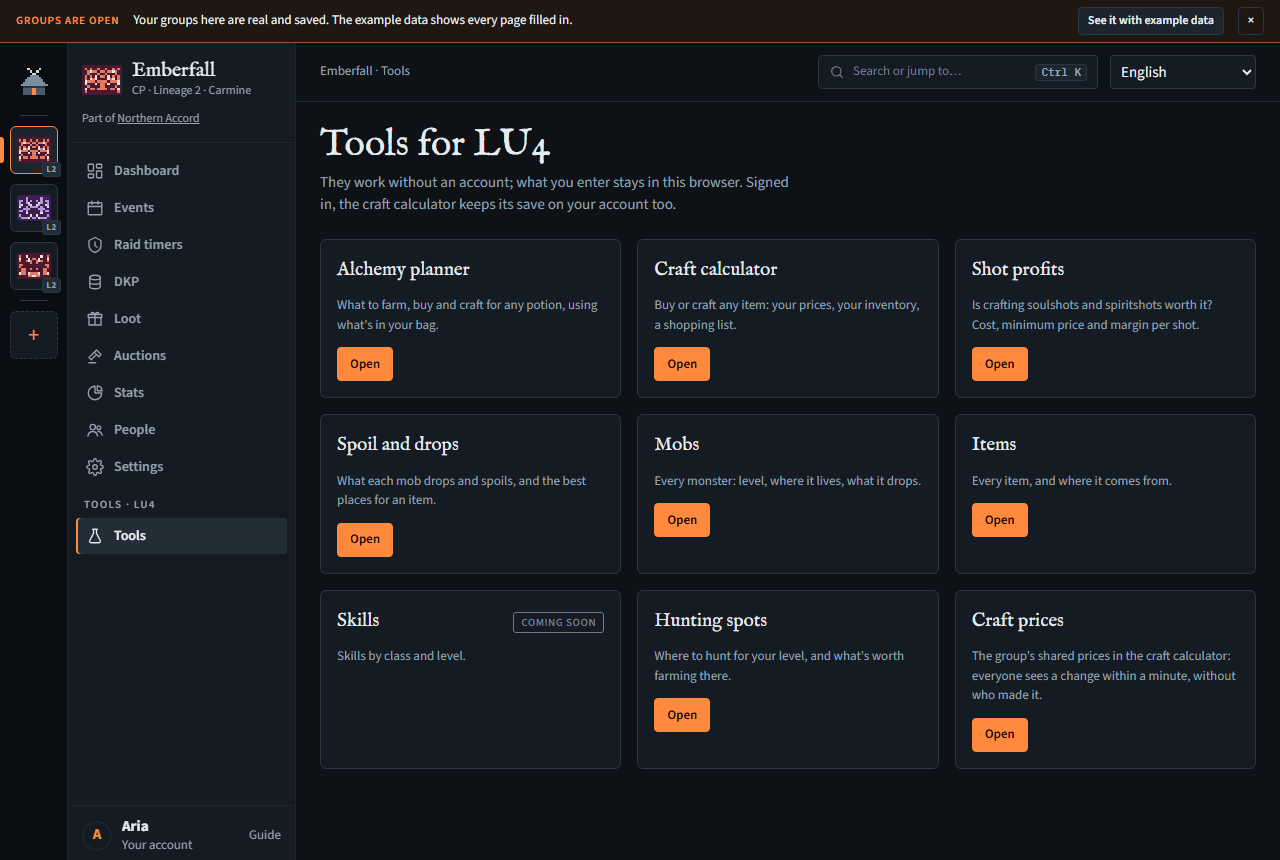
LU4 groups have Tools at the bottom of their menu (Tools · LU4); groups on the other Lineage 2 servers don't, as the tools are LU4's; they're also at meadhall.app/tools for anyone.
- Alchemy planner (LU4): ready. Press Open. It keeps its data in your browser, signed in or not: unlike the craft calculator, it doesn't save to your account yet. Its checklist numbers each stage (Stage 1 · from raw reagents, Stage 2 · from compounds, Stage 3…); an ingredient you hold some of but not enough of is red, one you hold none of is grey.
- Craft calculator (LU4): ready. See below.
- Shot profits (LU4): ready, a tab of the craft calculator. See below.
- Items (LU4): ready. Search every item by name, grade, type and where it comes from (quest items only when you choose Quest items; with nothing typed, the items something crafts, uses or drops come first), with a count of what's found; a weapon with a special ability (Sword of Valhalla Haste) has its weapon's grade, so the grade filter finds it; a crafted item's masterwork (the game's Sealed Masterwork Item, on an id of its own) is listed as its own item, Sealed Blue Wolf Gloves B (Masterwork), with its own prices in the calculator; the dual swords (Saber*Saber and the rest, 115 of them) are listed with their grade and NPC price, but not yet how Pushkin in Giran makes them, so the calculator can't cost one; an item shows its prices (yours from the craft calculator, from this browser's save or, signed in, your account's, whichever is newer; and the market price from the source you pick under Market price from: Your clans (each LU4 clan you're in, signed in, read again a minute later so a price just changed in the calculator shows on the next item) or Every clan (median) (the median of every LU4 clan's price); your pick is kept in this browser, and until you pick it's your clans when you're in one, else the median; then the NPC's) and, for a craftable one, what crafting it costs with your price first, then the picked one and whether to craft or buy, each material priced; its recipe, what it's used in, and every mob that drops or spoils it, and links back to the list, to Craft this in the calculator (it's added to your plan) and to Where to get it (Spoil and drops), with the chance and how many a kill gives, in words: ≈10 a kill, or 1 in 140 kills for a rare one (the exact figure shows when you hover it). Each item with a recipe, a use or a source also has a page of its own that search engines list, such as Short Sword, linking back to the lookup.
- Mobs (LU4): ready. Search by name, level, zone and aggression; a mob shows its level, HP, respawn, zone, drops and spoils. About half the mobs have no zone in the data, shown as —; two mobs with the same name and level are different ones to the game (each with its own drops, such as an event one beside the field one), so the lists show each one's number, Bearded Keltir #18003. Every mob has a page of its own too.
- Spoil and drops (LU4): ready. Pick up to ten materials from the list that opens as you type (each with its icon and how many mobs give it; the ones no mob gives come last; the arrow keys and Enter pick one) and get the mobs that give them, best first, with a spoil-only switch and a level range. The picks are in the page's address, so you can share the result.
- Hunting spots (LU4): ready. The zones by level, starting at your character's level when you're signed in (your LU4 main, else your highest LU4 character) until you type a level yourself; a zone shows its mobs and the materials worth farming there, best first by the adena a kill brings in: at your craft calculator prices where this browser has them, else what an NPC pays (marked NPC). Each zone has a page of its own as well.
- Skills: marked Coming soon.
The lookups need no account and keep nothing about you; they remember your last filters in your browser. Every name links to its own page.
Every table in the LU4 tools sorts: the lookups and their item, mob and hunting-spot pages, the craft calculator (except the material tree, which keeps its shape) and the alchemy planner. Press a column's heading to sort by it, and again to turn it round. A lookup's list sorts only the rows it shows: when it says more match, narrow the search first.
A bar across the top of every LU4 tool (LU4 tools) moves between all of them: the craft calculator, the alchemy planner and the four lookups. Under it, each tool's own name says which one you're on (Meadhall Craft, Meadhall Alchemy, Meadhall LU4 for the lookups). The bar's LU4 tools label, and that name, go back to all the tools. On a phone the bar scrolls sideways (an edge with more tools fades out), and the tool you're on is scrolled into view. On its right, signed in, your name opens your Me page and Hub your groups; signed out, it has Sign in with Discord (the craft calculator's is in its own header).
World of Warcraft has no tools yet.
Craft calculator
It answers one question for any LU4 item: is it cheaper to craft it or to buy it, with your own prices? Open it from Tools or at meadhall.app/tools/l2/lu4/craft. It needs no account; everything it keeps (your prices, inventories and plans) stays in this browser until you sign in (below).
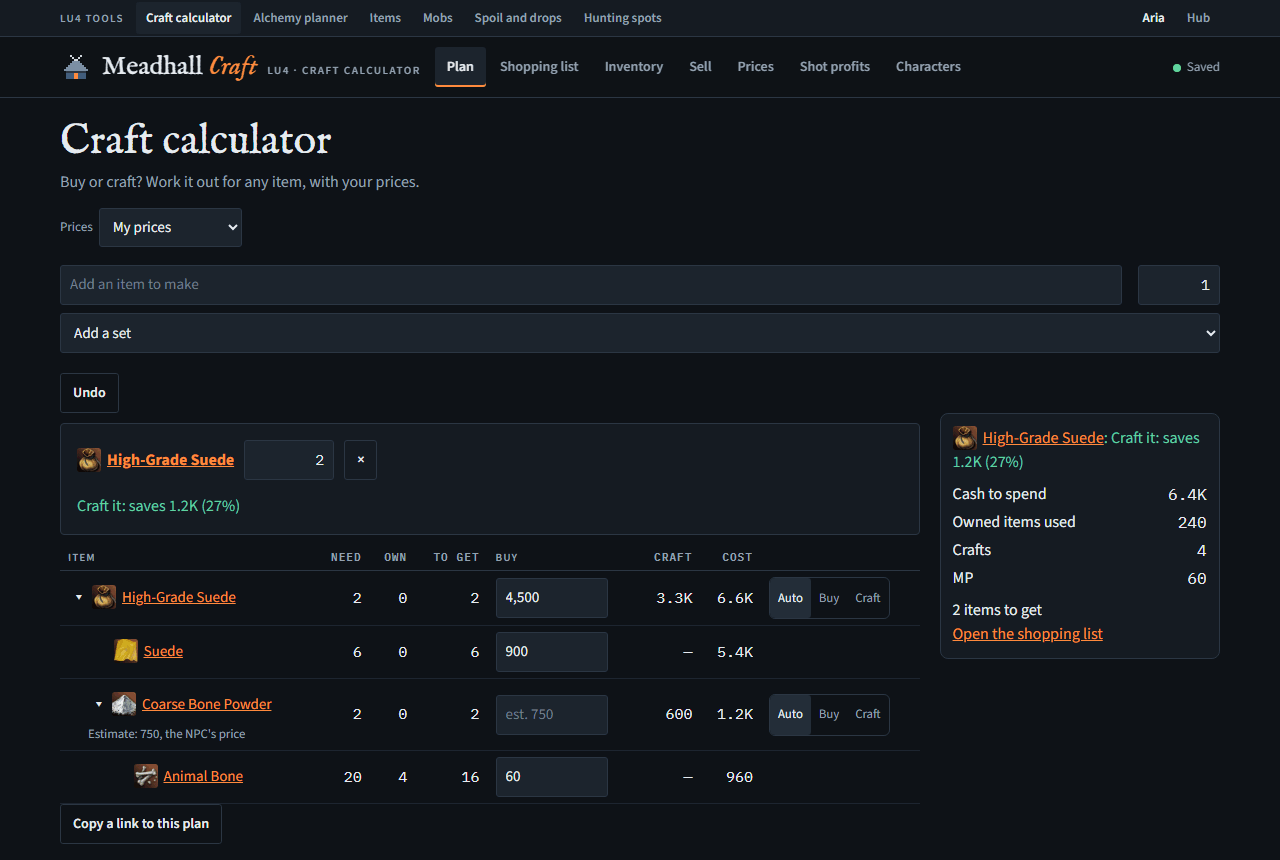
- Plan: add the items you want to make (the search lists the name you typed first, then craftable items, each with its icon and kind; recipes and unidentified items only when you type recipe or unidentified), or a whole armour set, Heavy, Light or Robe (untick the pieces you don't want). Each item gets a verdict, "Craft it: saves 1.2K (27%)" or "Buy it", and a tree of every material with how many you need, own and still have to get. Type a price straight into a row:
1200,45k,1.2kkor1,5kk; numbers show their thousands commas (16,000) as you type, and a price is saved as soon as you leave the box (or press Enter). Each row has Auto, Buy and Craft: Auto picks the cheaper side it knows. A recipe that can fail is costed and listed for one try, as the recipe is: a 60% recipe for 1 item takes 1 set of materials, and its cost is that set's, not what failures might add. Adena a recipe takes is counted as itself, 1 adena each, so it never needs a price. A recipe that makes several (200 soulshots a craft) says so beside its verdict (One craft makes 200, so this plan makes 200): the cash is for whole crafts, while the verdict's cost is for one item. Until every material has a price, the verdict says what crafting costs at least and how many materials still need one (Crafting costs at least 1.2M; 6 materials still need a price), with a link to Prices; if that's already more than the item's price, it says to buy. The tree shows the same ≥ amounts for crafted parts, and the summary's cash is at least the priced part. An item with no recipe says so. With several items in the plan (a set), their verdicts are one line each. On a wide screen a summary sits beside the tree (cash to spend, crafts, MP, and how many items are left to get, with how many still have no price; Shopping list splits them into what to buy and what to farm); on a phone it's a bar at the bottom, above the tabs, and each row of the tree is a card (the item, its numbers each named, the price box and Auto, Buy, Craft), so nothing scrolls sideways. - Shopping list: what the plan still needs. To buy lists what you've priced; To farm lists the rest with the best mobs for each, and a link to every source. Tick an item when you have it: say which character holds it and it goes into that character's inventory, so it comes off the plan.
- Inventory: what each of your characters holds. Everything counts toward your plans. Add items one by one, or paste a list, one item a line (
Animal Bone x 20). Pasting again replaces the list: an item you didn't have is added, one you have takes the pasted count, and one the paste doesn't name is removed. When that would remove anything, it says how many first and waits for Remove them and replace (or Cancel, which keeps the pasted text); after, it says how many were new, updated, unchanged and removed. A paste with no line it understood changes nothing. - Sell: what to put in a private store, each item one adena under your price for it, the biggest totals first; press a column's heading to sort by it, and again to turn it round (Copy as CSV keeps that order). Pick a character, or All characters. Items your plan uses are listed too and marked, so you can leave them out. Items with no price, and those an NPC pays as much for, are folded underneath. Copy as CSV puts the list on your clipboard.
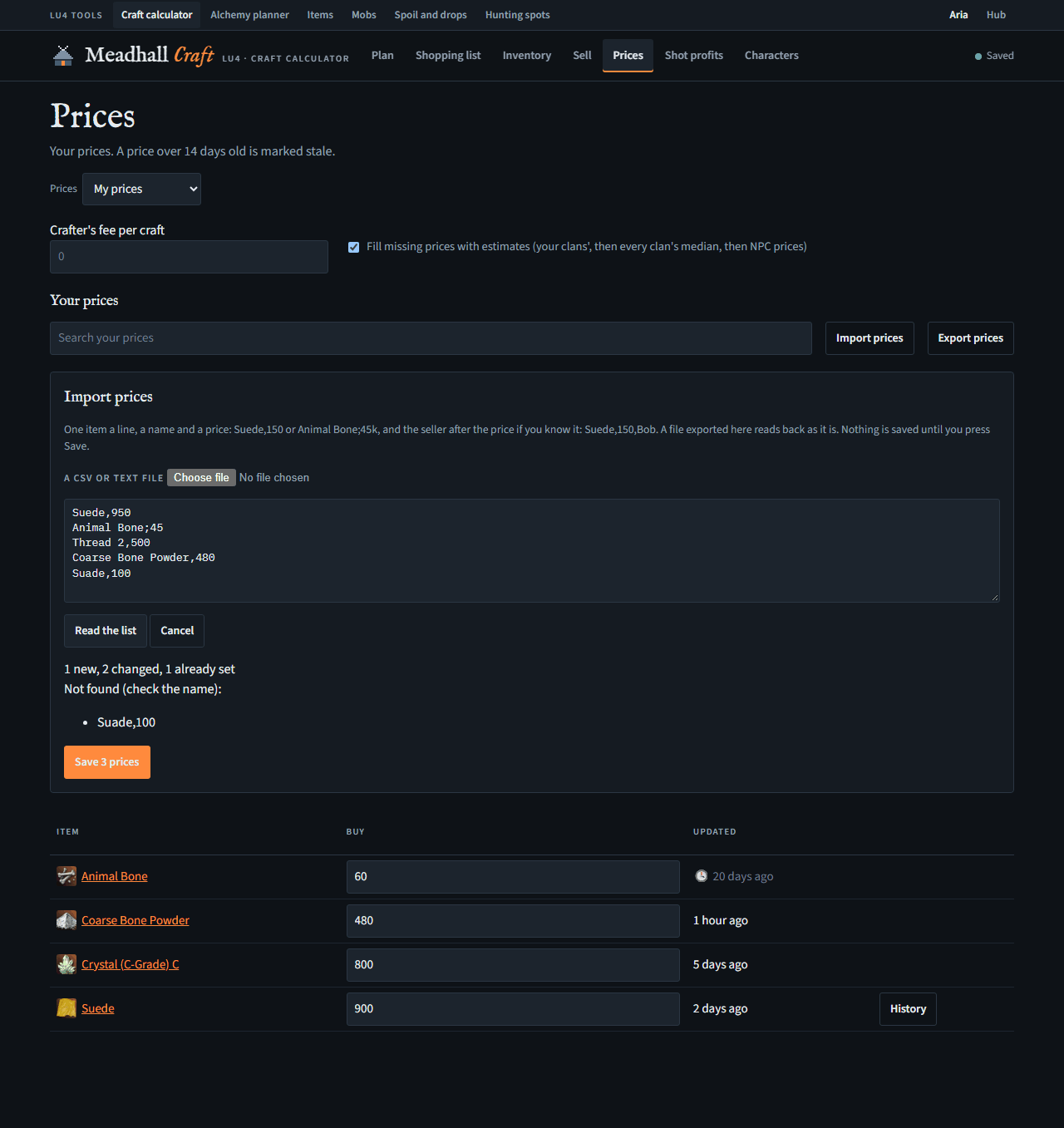
- Prices: every price you've set, when you set it, and its history: History says the lowest and highest price with the date of each, and the median of the prices set with the dates they span, then lists each change, newest first, with how much it went up (▲) or down (▼). A price over 14 days old is marked stale. The crafter's fee is a cost per craft, for when you pay a dwarf. Import prices takes a CSV or text file, or a pasted list, one item a line (Suede,150, Animal Bone;45k, Thread 2,500), with the seller's name after the price if you have it (Suede,150,Bob, or the seller column Vigil's market export writes): it shows what's new, changed or already set, and the lines it couldn't read, and saves only when you press Save (one Undo takes it all back). With clan prices, they're saved as the group's, under your name, if your role can change them. A seller is kept with its price and shown in a Seller column; the same price from another seller counts as a change, and typing a new price yourself clears it. Export prices downloads the prices shown as a CSV for a spreadsheet, with a seller column when any price has one, which Import reads back.
- Estimated prices: an item you (or your clan) haven't priced is filled in, for the sums only, with the price your LU4 clans have for it, signed in (one clan's price, or the median of yours if you're in several; not the clan whose prices you're using), else the median of every LU4 clan's price for it (when any clan prices it, from the last 60 days: priced by one clan only, it's that clan's price; worked out each night), else, for a material (never the item you're making), the price an NPC pays for it. The price box stays empty, with est. 1.2K in it, and the row says which (Estimate: 1,200, Emberfall's price, Estimate: 1,200, the median of 7 clans' prices, or the NPC's price: that's what an NPC pays you, so it's low). The summary says how many prices are estimates, and from where: signed out, or in no LU4 clan, the median of every clan or the NPC's. Type a price to replace one. To work with your own prices only, untick Fill missing prices with estimates on Prices; that choice is kept in this browser.
- Characters: the characters whose inventories count. Signed out, add, rename or remove them here. Signed in, they're your Meadhall account's Lineage 2 characters, on every server, each with its own inventory in the calculator: one you add here (a name, a class and a level, on LU4) is added to your account too, and one you add in the hub shows here. Rename or remove them on your Me page. The first time you sign in, a character here with the same name as one on your account is linked to it, inventory and all, and the empty starting one goes. One only in the calculator stays, marked Only in this calculator, with Add to Meadhall.
Copy a link to this plan shares the plan (not your prices or inventory); opening the link asks before replacing your own plan. Undo takes back the last change.
Signing in
Sign in with Discord, at the top right, keeps the calculator's save on your Meadhall account too, so it follows you to another browser or your phone. Each change is saved in this browser at once and sent to your account a couple of seconds later; the word beside the dot says how that's going: Saved, Syncing, Offline (it sends once you're back online), Conflict or Not saved (hover it for why).
The first time you sign in with a save in this browser and another on your account, it asks which to keep: this browser's, your account's, or both (characters, prices and plans joined; for a character on both sides, the newer inventory). If two browsers change the same thing before they sync, it asks which to keep; changes to different things are joined without asking. If the save in this browser was synced with a different Discord account and yours has none yet, it asks whether to upload it or start empty. Closing a question (Escape) leaves both copies as they are and asks again next time; until you answer, nothing is sent. Nothing is overwritten without you choosing it.
In a Discord server with Meadhall's bot, the bot answers /lu4 item and /lu4 set with the same data, for anyone, account or not: an item's recipe and where to get it, or a set's pieces (the bot's commands). A server linked only to groups on another game or server is told they're for LU4; a server not linked to any group still gets the answer. Signed in, /lu4 craft prices a craft with the clan prices (or yours, with prices: mine), and /lu4 price sets a clan price.
Clan prices
An LU4 group can keep shared prices for the calculator: its clan prices. Signed in, the Prices picker on every page that uses prices (Plan, Shopping list, Inventory, Sell, Prices and Shot profits) offers My prices and each LU4 group you're in; it's chosen per plan, so the calculator opens on the same prices however you reach it, and a change says so (Now using Emberfall's prices). With a group's prices, every price you set is the group's, and everyone using them sees the change within a minute, marked with when (updated by another member, 2 minutes ago). Clan prices are anonymous: Prices shows when each one was set and its history comes from the group, but neither says who set a price. Only prices are shared: your characters, inventories, the crafter's fee and Shot profits settings stay yours.
Every member can change them unless a leader takes Change the group's craft calculator prices (LU4) from their role; then they're read-only, with a lock. The group's Tools page has a Craft prices card that opens the calculator on the group's prices. Signed out, the picker shows My prices with a Sign in for clan prices button beside it. With a group's prices, Prices says whose they are (Emberfall's prices).
Shot profits
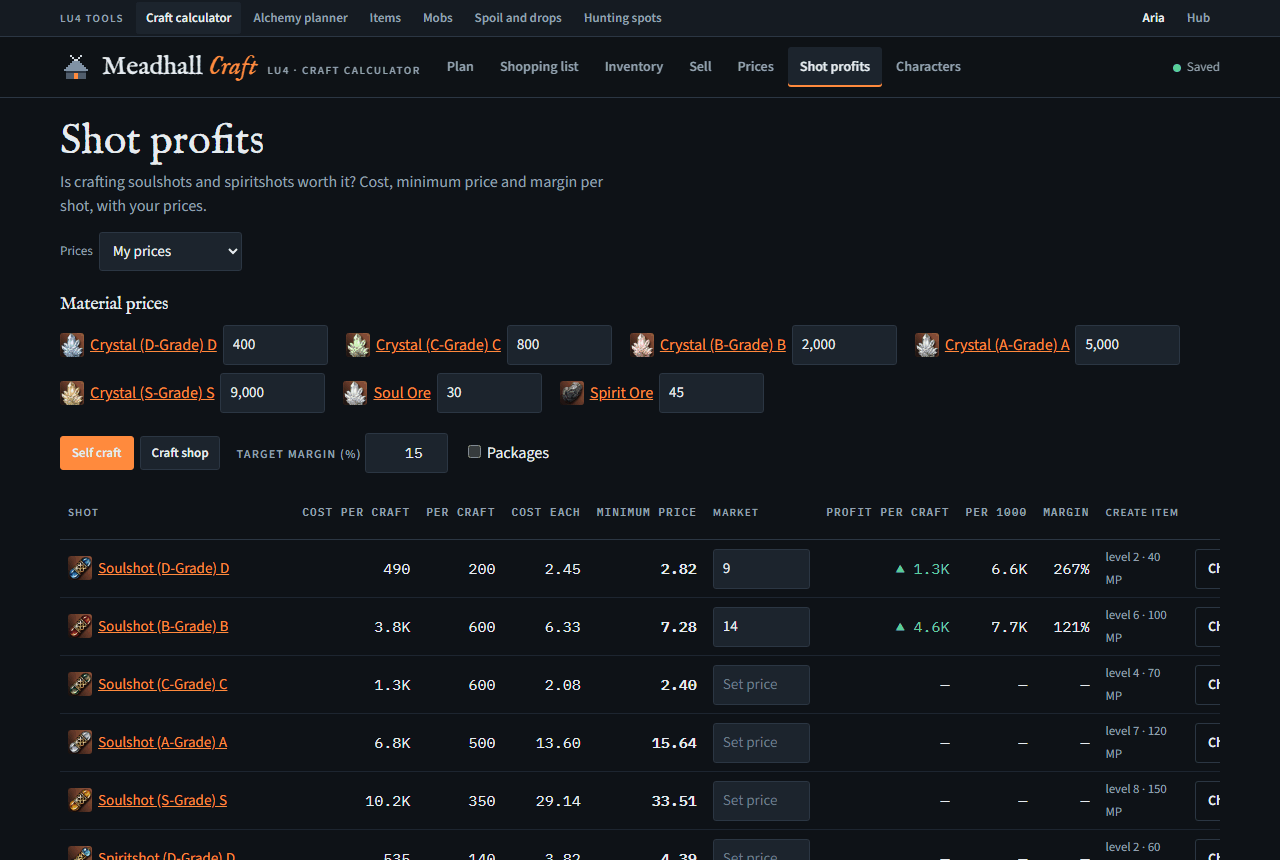
A tab of the craft calculator that answers: is buying crystals and ore to craft soulshots and spiritshots worth it, and what's the lowest price you can sell at? Set the prices of Soul Ore, Spirit Ore and each grade's crystal once at the top (one you haven't set takes an estimate, as on Plan, shown as est. 125 in its box, unless estimates are switched off on Prices; a shot's own market price is never estimated); each shot then shows its cost per craft and per shot, the minimum price per shot that makes your target margin (0% is break-even), and, once you enter what it sells for, the profit per craft and per 1000 shots and the margin. Losses show in red.
- Self craft: you craft it; each row shows the Create Item level and MP it needs.
- Craft shop: you pay a dwarf a fee per craft. Enter each shot's fee; until you do, no profit is shown, as a shop is never assumed to be free.
- My stock: the shots you already hold. Enter how many of each you have and what you paid for each crystal and ore; it shows each shot's cost at those prices, its sell price (the Market price above), the profit on each and on all of them, and the total profit of your stock. A material with nothing paid set uses today's price, and the page lists which. Your stock and paid prices are yours only: they stay in your save even when the plan uses your clan's prices.
- Packages adds the compressed packages, costed from your own cost per shot plus the Rope of Magic.
- Choose a row to see a batch (what to buy, the cash out, what it sells for, the profit) and add it to your plan.
The prices are the calculator's own: a crystal priced here is the same price in Plan and Prices.